September 7, 2026
Business Process Automation Software: What a 5-20 Person Business Should Actually Look For
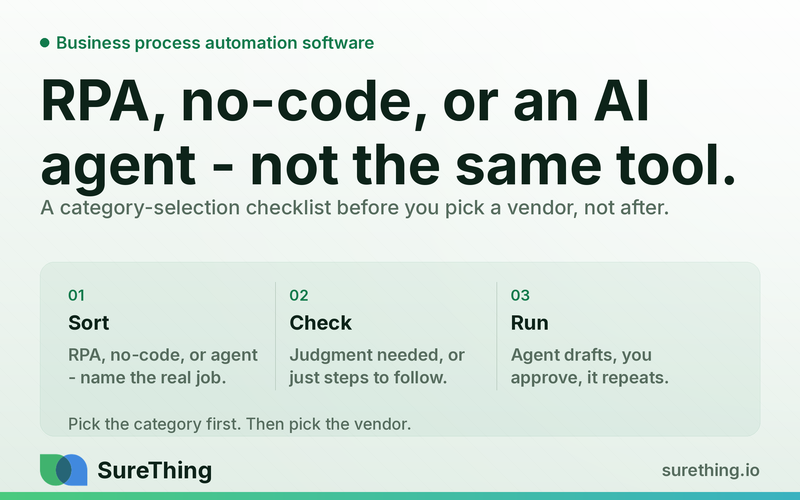
RPA, no-code workflow builders, and AI agents all get pitched as "business process automation software" - but they solve different problems. A category-selection guide before you pick a vendor.
The Short Answer
For a 5-20 person business, the right business process automation software isn't the one with the most integrations or the flashiest demo — it's the one that matches how much judgment your work actually requires. Simple, high-volume, rule-based tasks (data entry, file moving, form scraping) belong in RPA tools. Multi-app "when this happens, do that" workflows belong in no-code builders like Zapier or Make. Anything that requires reading context, making a judgment call, and drafting something a human should approve — replies, outreach, reports, follow-ups — is a job for AI agents, not either of the older categories.
Key Takeaways
RPA (robotic process automation) tools were built for large companies with legacy software and repetitive, rules-based data tasks — most small businesses don't have the volume or the systems to justify them.
No-code workflow builders like Zapier and Make are excellent at moving data between apps but can't read a message, understand context, or draft a human-sounding response.
AI agents are the category built for the actual bottleneck most small teams have: not moving data, but making small judgment calls hundreds of times a week.
The buying mistake isn't picking a bad vendor — it's picking the wrong category and then blaming the tool when it can't do what you needed.
A workable rule of thumb: if a task needs "if X then Y," a workflow tool can handle it; if a task needs "read this and decide," you need an agent with a human approval step.
Start with one workflow that has a clear trigger, a clear approval point, and a clear owner — not a company-wide automation rollout.
The Real Bottleneck: You're Not Short on Software, You're Short on Judgment Bandwidth
Most owners in the 5-20 person range don't have a data-movement problem. Their invoices already go from the accounting system to the bank. Their leads already land in a CRM. The apps are mostly connected — somebody set up a Zapier flow two years ago and it still runs quietly in the background. The actual bottleneck is different: it's the dozens of small decisions a day that require someone to read something, think for ten seconds, and respond. A review that needs a reply. A lead that asks a slightly off-script question. A vendor email that needs a status update. None of these are hard decisions. But they all require a human brain to touch them, and there's only one or two human brains in the building who know the business well enough to do it right.
This is why so many small businesses end up "automated" on paper — five or six Zaps running, a shared inbox with rules — and still feel just as stretched as before. The tools moved data faster, but they didn't reduce the number of times someone has to stop, read, and think. That's the gap that RPA and no-code workflow tools were never built to close, and it's the gap that a newer category, AI agents, is actually built for. If you've already mapped out where time leaks in your back office, this is a natural next step — see our breakdown of the recurring back-office loops that eat owner time for how those decision points typically show up.
The confusion in the market doesn't help. Vendors in all three categories — RPA, workflow automation, and AI agents — now use the word "automation" to describe themselves, so from the outside they look interchangeable. They're not. Picking the wrong one means either overpaying for capability you don't need (enterprise RPA licensing for a ten-person shop) or underpaying for capability you actually need (trying to force a no-code builder to "handle customer replies" when it has no way to read intent or draft language). The category decision has to come before the vendor decision, and that's the part most buying guides skip.
What a Runnable Workflow Actually Looks Like
It's easier to see the difference between categories by walking through one real workflow end to end — in this case, handling incoming customer reviews and messages — and noting where each category of tool would stop.
Trigger
A new review lands on Google Business Profile, or a message comes into a shared inbox, or a form submission arrives from the website. This is the easy part — every category of tool can watch for an event like this. RPA can poll a system on a schedule. Zapier or Make can watch for a webhook or new row. An AI agent can be told to monitor the same sources continuously.
Read
This is where the categories split. A no-code workflow tool can see that a new review arrived and can read the star rating and the raw text, but it has no way to understand what the review is actually saying, whether it's a complaint that needs urgent handling, or whether it references a specific staff member or product. An AI agent reads the review the way a person would: it checks the star rating, the tone, whether it mentions a specific issue, and cross-references it against context you've given it — your brand voice, your policies, recent similar reviews. This is closer to what's described in what AI agents can actually do for a small business — reading and interpreting, not just relaying data.
Does
The agent drafts a reply matched to your tone — apologetic and specific for a complaint, warm and short for a five-star review, neutral and clarifying if the review is confusing or possibly fake. It doesn't just fill in a template with the customer's name; it writes something that reads like it came from someone who read the actual review. The same underlying capability extends to drafting outreach messages to leads, drafting social captions from a photo or a product update, or pulling structured data from Google Search Console or ad platforms into a plain-English summary — the kind of pull-and-summarize work covered in automated business data reporting.
Nod
Nothing goes out without a human glance. The draft reply sits in a queue — Slack, email, or a simple dashboard — with an approve, edit, or reject option. For a five-star review with a generic thank-you, approval might take three seconds. For a one-star review naming a specific staff member, the owner reads the full draft, maybe tweaks a line, and approves it. This is the difference between an agent and a chatbot: a chatbot replies live and unsupervised; an agent drafts and waits, which matters enormously for anything customer-facing. That distinction is worth reading in full in how AI agents differ from chatbots if you're still unclear on it.
Routine
Once this runs cleanly for a couple of weeks, it stops being a project and becomes a standing habit: reviews and messages get drafted responses within minutes instead of sitting for two days, someone spends ten minutes each morning approving a batch instead of writing from scratch, and the backlog that used to pile up over a busy week simply doesn't accumulate anymore. This is the version of automation that's actually built around a small team's constraints — a platform like SureThing is designed around exactly this trigger-read-does-nod-routine shape rather than requiring you to hand-build it from scratch in a workflow builder.
Comparing the Three Categories
Before comparing vendors within a category, it's worth being blunt about what each category is and isn't good at. This table is deliberately about capability differences, not brand names.
Category | Best at | Can't do well | Typical fit for a 5-20 person team | |
|---|---|---|---|---|
RPA tools | High-volume, rules-based tasks on legacy or screen-based systems (data entry, form scraping, repetitive copy-paste between old software) | Judgment calls, natural-language drafting, adapting when a screen layout or process changes slightly | Rare — usually overbuilt for a small team's volume and IT setup | |
No-code workflow builders (Zapier, Make, etc.) | Moving structured data between apps on a clear trigger ("new row → send email," "new form → create task") | Reading unstructured text for meaning, drafting anything that needs to sound human, making a judgment call between options | Good for plumbing — connecting tools you already use — but not for anything that requires reading and deciding | |
AI agents | Reading messages, reviews, and documents for context; drafting replies, outreach, reports, and social content; flagging what needs a human decision | Fully unattended action on anything with financial, legal, or reputational risk; tasks with no clear approval point | Strong fit — matches the actual bottleneck of judgment-heavy, low-volume tasks a small team faces daily | |
Manual process (no tooling) | Full control, no setup cost, works for genuinely rare or highly sensitive tasks | Scaling with the business, consistency across staff, speed during busy weeks | Fine for truly occasional tasks; a bottleneck everywhere else |
One pattern worth noticing in that table: RPA and no-code tools are both, at their core, "if this, then that" systems. They differ in setup complexity and target systems, but neither one reads for meaning. AI agents are the first category built to sit on top of the "if this, then that" logic and add the missing piece — actually understanding what came in before deciding what to do with it. Industry research on process automation adoption has generally found that smaller businesses adopt automation and AI tools at a different pace and ramp-up curve than large enterprises, which is part of why RPA vendors built for enterprise IT departments rarely translate well to a ten-person shop.
Where the Boundaries Actually Are
Being honest about what should and shouldn't run without a human is more useful than another feature comparison. Here's how that breaks down across all three categories, not just AI agents.
What can run fully unattended
Moving data between systems you already trust (CRM to spreadsheet, form to task list) — this is what no-code tools have always done well and can keep doing without supervision.
Monitoring — watching for new reviews, new mentions, new form submissions, changes in ad spend or search rankings — without taking any action yet.
Internal scheduling and reminders that don't touch a customer or a public-facing channel.
What needs a human nod
Any drafted reply to a customer, reviewer, or lead, no matter how routine it looks — tone mistakes are reputational, not just cosmetic.
Outreach messages to prospects or partners, even when the list and the template are pre-approved.
Anything summarizing performance data (search, ads, sales) that will inform a decision about spend or strategy — the summary can be automated, the interpretation should still get a second look.
Social posts and public content, even when the draft is strong — brand voice drift happens gradually and is easier to catch before publishing than after.
What should never be automated
Anything that constitutes legal, tax, insurance, or investment advice to a customer or employee — that judgment needs a licensed professional, not a drafted response, however polished.
Final decisions on hiring, firing, pricing changes with legal implications, or contract terms — automation can prepare the information; it shouldn't make the call.
Sensitive HR or personnel communications — these need a human voice and human accountability from start to finish, not a draft-and-approve loop.
The pattern across all three lists is consistent: automate the reading and the drafting, keep the deciding and the sending with a person, and never let software stand in for advice that requires a license. Businesses that get burned by automation almost always skipped the middle category — they let something go out the door that a human should have read first.
Frequently Asked Questions
Do I need RPA if I'm a small business?
Almost certainly not, unless you're doing very high-volume, rules-based data entry across old, screen-based software with no modern API — the kind of setup common in large back-office operations but rare in a 5-20 person business. If your tools are mostly modern cloud apps, RPA is usually the wrong category entirely.
Isn't Zapier or Make basically the same as an AI agent?
No — they solve a different problem. Workflow builders move data between apps based on triggers you define; they don't read unstructured text for meaning or draft anything that needs to sound human. An AI agent can read a message and produce a context-aware draft; a workflow builder can only pass that message along to the next step you've wired up.
How do I know which category my business actually needs?
Look at the task, not the tool. If the task is "move this data from A to B when X happens," a no-code workflow builder is enough. If the task is "read this and decide what to say or do," you need something with reading and drafting capability, which points to AI agents. If you're not sure, map out where time actually leaks in a normal week before shopping for software — that's a more reliable starting point than a feature list.
Is it risky to let an AI agent handle customer-facing tasks?
It's risky if the agent is allowed to act unsupervised — that's a different product category, closer to a chatbot. Set up correctly, an agent drafts and a human approves before anything goes out, which keeps the risk profile close to having a well-trained assistant rather than an unattended system. Reviewing that approval step before turning anything on is worth the extra ten minutes.
What's a reasonable first workflow to automate?
Pick something with a clear trigger, low stakes if it's slightly wrong, and a fast approval step — review responses and inbound message triage are common starting points because the volume is steady, the drafts are easy to check quickly, and getting it wrong once isn't catastrophic. Broader financial or reporting workflows are worth tackling once that first one is running smoothly.
Where to Go From Here
You don't need to overhaul how your business runs to get value from this — you need to pick the right category for the specific bottleneck you actually have, and be honest about which decisions still need your eyes on them. Most small teams find that a mix works best: keep the workflow builders you already trust for moving data around, and bring in an agent for the judgment-heavy work that's been quietly piling up in your inbox and your review notifications. Broader adoption data on small business technology spending suggests owners in this size range are increasingly comfortable trying new categories of tools rather than sticking with what they already have, as long as the setup cost is reasonable — see recent research on small business technology adoption trends for more on that shift. If you want to see what this looks like without committing to a full platform migration, SureThing is built to run exactly the trigger-read-does-nod-routine loop described above, one workflow at a time, so you can judge it by what it actually does for your inbox this week rather than by a feature list.