August 29, 2026
AI Lead Follow-Up: How to Answer Every Lead in Minutes, Not at the End of the Day (2026)
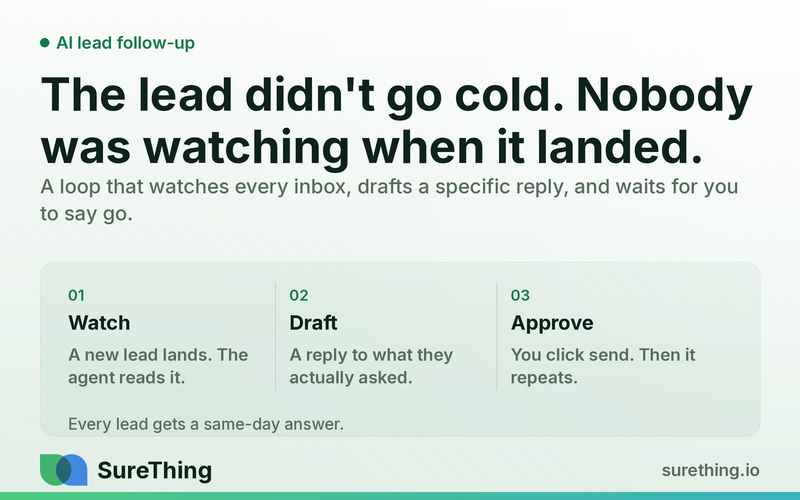
A lead that sits unanswered for four hours isn't lost because nobody cared — it's lost because nobody was watching the inbox when it landed. The loop that watches every channel, drafts a specific reply, and waits for a human to say go.
The Short Answer
A lead that goes unanswered for four hours is not lost because nobody wanted to answer it — it's lost because nobody was staring at the inbox at 2:14pm on a Tuesday, and by the time someone was, three other companies already had. Fixing that is not a headcount problem and it is not a discipline problem. It's a routing problem: something has to notice the message the second it lands, draft a reply that isn't generic, and get it in front of a human fast enough that "fast enough" still means something. The fix is not a bigger sales team and it is not a chatbot that answers on its own — it's a narrow loop that watches, drafts, and waits for a person to say go.
Takeaways:
The leak isn't lead volume, it's the gap between a lead arriving and a human noticing — and that gap is measured in hours, not minutes, for most small businesses running lead follow-up by hand.
An agent can watch every inbox and form 24/7, draft a specific reply within minutes, and queue it for approval — but it should never send the first message to a new lead without a human clicking send.
The system that works is not "AI replies to everything." It's trigger → read the actual lead context → draft a specific reply → human approves or edits → send → log the follow-up so nothing falls through twice.
Where this fails in practice is usually not the AI writing bad copy — it's nobody defining which leads get a human-approved draft versus which get logged as "needs a phone call," and the two paths get treated the same.
The Bottleneck Is the Gap Between "Arrived" and "Noticed"
Why This Isn't a Headcount Problem
Most small businesses do not have a lead-volume problem. They have a lead-follow-up-timing problem, and it is invisible until you measure it. A contact form fills out at 11:40am while the owner is mid-install at a client site. A Google Ads lead calls the tracking number and leaves a voicemail while the front desk is on another call. A Facebook message comes in at 9pm, after the shop closed, and sits there until whoever opens the laptop next happens to check that inbox.
None of these are failures of will. They're failures of attention bandwidth — a person can only watch one inbox at a time, and a lead doesn't wait for you to be free. Every hour a lead sits unanswered, the odds it converts drop, because the prospect is very likely doing the same thing on a competitor's site at the same time. The team that answers first with something that actually addresses what the lead asked — not a form-letter "thanks for reaching out!" — has already won a large share of the outcome before either side picks up the phone.
This is why "hire someone to answer faster" rarely fixes it at small-business scale. The problem isn't headcount, it's coverage: leads don't arrive on a schedule, and a human checking four inboxes twice a day cannot compress the gap below hours. An agent that reads every inbox continuously can compress it to minutes — but only if the reply it drafts is actually specific to what the lead said, and only if a human still decides whether it goes out.
What the Research on Funnels and Scoring Actually Assumes
The standard purchase funnel model treats "awareness" and "consideration" as stages a prospect moves through in sequence — but that model quietly assumes someone is tending the funnel at each stage. Lead scoring exists specifically to help a business decide which leads deserve attention first when there are more leads than people to work them — a reasonable idea for a large sales team, but for a five-person shop the real answer is usually simpler: every single lead deserves a fast, specific first reply, and the problem to solve is speed and specificity, not triage.
What "Automated Lead Follow-Up" Actually Means Here
This is not a chatbot that answers questions on your website. It's a background process that watches where leads land — a contact form, a booking widget, an ad's lead form, an inbox — and for each new one, does four things in order: reads the lead's actual message and any known context (source, service requested, prior contact history), drafts a reply that responds to what they specifically asked rather than a generic template, puts that draft in front of a human for a yes/no/edit decision, and once approved, sends it and logs that a follow-up happened so the next check-in knows what's already been said.
The part that makes this different from a canned autoresponder is the drafting step. A canned autoresponder says the same thing to everyone who fills out the form — the kind of blast email marketing is built around, sending the same commercial message to a group of people. A drafted-then-approved reply is the opposite of a blast: it references the actual service the lead asked about, answers the specific question they raised if there was one, and reads like it came from a person who looked at the message — because a person did, at the approval step, even if they didn't type the first draft.
The Runnable Flow
The workflow below is what this looks like end to end, from the moment a lead shows up to the moment the loop closes.
Stage | What Happens |
|---|---|
Trigger | A new lead lands — contact form submission, ad lead-form entry, inbound email, or missed-call voicemail transcript. The trigger fires the moment the lead is captured, not on a schedule. |
System reads | The agent pulls the lead's message text, the source (which form, which ad, which page), and any existing record of that contact — has this person reached out before, is there an open quote, is there a service history. |
Agent drafts | A reply is written that answers what was actually asked: if they asked about pricing for a specific service, the draft addresses that service, not a generic "we offer many services" line. If information is missing to answer properly, the draft asks a clarifying question instead of guessing. |
Human approves | The draft sits in a queue — email draft, chat draft, or task card — for a person to approve, edit, or reject before anything reaches the lead. This step is never skipped for a first contact with someone new. |
Send + log | Once approved, the reply sends through the business's own inbox or number, and the interaction is logged against that lead's record so the next follow-up (a nudge after 3 days of silence, for instance) knows what was already said. |
Routine | The same loop runs on every new lead without anyone re-triggering it — the trigger is the lead arriving, not a person remembering to check. |
Where the Human Still Has to Nod
The single point that decides whether this is safe is where approval sits. First contact with a brand-new lead — someone who has never heard from the business before — always goes through a human approval step before sending. That is not a limitation of the system; it's the boundary that keeps a wrong guess (misreading the lead's request, quoting the wrong price, promising something the business can't deliver) from reaching a stranger before anyone caught it.
Later touches in an existing, already-approved conversation thread can run with lighter oversight once the pattern has proven reliable for weeks — a scheduled nudge to a lead who went quiet, for example, using language a human has already reviewed and approved as a template. But the decision to loosen that oversight is itself a human call, made after watching the drafts hold up, not a default setting turned on from day one. This mirrors the general framing in NIST's AI Risk Management Framework: an AI system's outputs need a human checkpoint sized to the actual consequence of getting it wrong, not a blanket rule that's either always-on or always-off.
Boundaries: What Runs Unattended, What Needs a Nod, What Never Automates
Can run unattended once proven: watching inboxes and forms for new leads, drafting the first reply for a human to review, logging every contact and follow-up attempt against the lead's record, flagging leads who've gone quiet for a scheduled check-in draft.
Needs a human nod every time: sending the first message to any new lead, quoting a specific price or availability, any reply where the lead has expressed frustration or asked to speak to a person directly.
Never automates: the actual sales conversation once it moves to negotiating terms, any promise about outcomes the business can't guarantee, and anything that requires judgment about whether to extend credit, a discount, or an exception to standard terms.
The line between the first two categories tends to move as trust builds, but it moves in one direction only — from "needs a nod" toward "can run unattended" — and only after weeks of a human reviewing the actual drafts and finding nothing worth catching. It should never move the other way silently; if a draft starts missing context or misreading a lead's intent more than once, that's the signal to pull a step back under review, not to tune the prompt and hope.
FAQ
Does this replace a sales person? No — it removes the gap between a lead arriving and someone competent looking at it. The sales conversation, the negotiation, the relationship — that's still a person's job. The agent's job is making sure that person's first look happens in minutes instead of at the end of the day.
What if the AI's draft misreads the lead's question? That's exactly why the approval step exists for first contact — a human reads the draft before it goes anywhere, catches a misread, and either edits it or writes their own response instead. The draft is a starting point, not a decision.
How is this different from a CRM's built-in automation? Most CRM automation sends the same templated email to everyone who matches a rule. This reads the specific message and source for each lead and drafts something that responds to what that person actually said, which is the difference between "thanks for your interest!" and an answer to the question they asked.
What happens on weekends or after hours? The watching and drafting don't stop — a lead who messages at 9pm still gets a drafted reply waiting in the queue. Whether it gets approved and sent at 9pm or first thing the next morning is a business decision, not a technical one.
What does the business need to have in place before this works? Just one thing: a channel the agent can actually watch — an inbox it can read, a form that logs submissions somewhere reachable, or a number whose voicemails get transcribed. Everything after that is drafting and approval, not new infrastructure.
Getting Started
The place to start is not "automate everything about lead follow-up" — it's picking the single form or inbox that leaks the most leads today and watching that one channel first, then measuring how much of the response-time gap actually closes before touching a second channel. A good first target is often the same channel already covered by paid traffic: if the business runs Google Ads leads or relies on new-patient or new-customer follow-up that's already tracked, the lead source is already known and the drafting step has more to work with. Once the drafts on that channel are consistently good enough that approving them takes seconds instead of minutes, extending the same loop to a second channel — and later folding it into the same back-office routines covered in back-office automation — is a small step, not a rebuild. The goal isn't fewer people touching leads — it's making sure every lead gets a same-day, specific response instead of whatever's left of someone's afternoon, measured not by how many messages went out automatically but by how few leads went a full business day without hearing back at all.