August 26, 2026
Dental Marketing Automation: The Four Follow-Ups That Stop New Patients From Slipping Away (2026)
Of every 100 people who call a dental practice about becoming a patient, only about 29 end up booked. The leak is not marketing — it is the gap between someone reaching out and someone replying. Here are the four follow-up jobs to automate, the afternoon setup, and the five numbers that prove it worked.
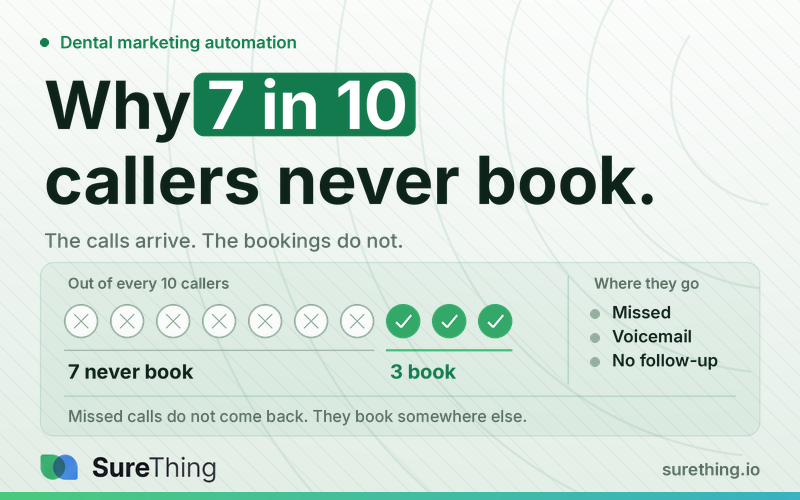
Short answer: for every 100 people who call a dental practice about becoming a patient, about 71 never book. Not because the marketing failed — the marketing worked, they called. They were lost in the gap between "they reached out" and "someone got back to them." The fix is not a bigger ad budget. It is one assistant that watches the inbox and the schedule, writes the follow-up the moment something comes in, and waits for a yes before anything goes out.
Below is the exact system: the four follow-up jobs that leak money, how to set them up in SureThing in an afternoon, and the five numbers that tell you within two weeks whether it is actually working.
Key Takeaways
Your practice does not have a marketing problem, it has a reply-speed problem. Of the new-patient calls a practice answers, only about 42% end in a booked appointment. The people were already interested enough to contact you.
Speed is the whole mechanism. Research on inbound inquiry response found that replying within 5 minutes instead of 30 makes you roughly 21 times more likely to qualify that lead. A front desk cannot hold that window during a busy afternoon.
Start with new-inquiry follow-up, not with the dormant list. It repeats daily, the right response is knowable, and the revenue shows up in two weeks instead of two quarters.
Every message offers two specific times. "Call us back" puts the work back on the patient, which is how a warm inquiry goes cold.
Clinical, insurance, and upset patients stay human — write that down before you switch anything on. This is not a limitation, it is the rule that makes the rest safe to run.
Nothing sends without your approval. Your job shrinks from writing thirty follow-ups to approving thirty follow-ups, which is about four minutes of a morning.
Where the 71 patients go
Call-tracking data from dental practices tells a brutal two-step story. Only about 68% of new-patient calls get answered at all. Of the ones that do get answered, only about 42% end in a booked appointment. Multiply those and you are left with 29 bookings out of 100 people who tried to become your patient — 71 lost per 100 calls.
Now add the part almost nobody measures: speed. Harvard Business Review's study of inbound lead follow-up, The Short Life of Online Sales Leads, found that contacting a new inquiry within 5 minutes instead of 30 makes you dramatically more likely to reach that person at all — the odds collapse fast after the first few minutes. Same finding across every study since: the person who replies first usually wins the patient.
Your front desk knows this. They also have two patients checking out, a hygienist who needs a chart, and a phone ringing. This is not a discipline problem. A busy practice is a stack of interrupts, and follow-up is always the thing that happens last.
Which is why the answer is not "try harder." It is: make follow-up something that happens without a human remembering to do it — but never without a human approving it.
Want your own number instead of the benchmark? Point SureThing at your practice inbox and ask it for every new-patient inquiry in the last two weeks that never got a reply. It reads the mailbox you already use, and it sends nothing — that first list is just you finding out how big your own 71 is.
The four jobs that actually leak money
Job | What sets it off | What should happen |
|---|---|---|
1. New inquiry follow-up | A website form, a new email, a voicemail transcript landing in the inbox | A reply drafted within minutes, offering two specific open times from your actual calendar — not "call us back." |
2. Tomorrow's gaps | A cancellation or no-show leaves a hole in tomorrow's schedule | The hole gets spotted the same afternoon, and the shortlist of patients waiting for exactly that slot gets messaged while it is still fillable. |
3. The dormant list | 6 months since a cleaning, 18 months since any visit | A short, specific note referencing their last visit. This list is almost always the cheapest revenue in the building — you already paid to acquire these people. |
4. Review requests | An appointment finishes in your calendar | One message a couple of hours later with a direct link. Anyone who had a complaint logged that day gets skipped automatically. |
Notice what all four have in common: zero judgment required, and they must happen the same way every single time. That is precisely the work humans are worst at and software is best at.
Only job #1 needs to be running today. Set up new-inquiry follow-up — it watches the practice inbox, drafts a reply offering two real openings from your calendar, and holds that draft until someone at the front desk approves it. The other three can wait until this one has a number behind it.
How to set this up in SureThing this afternoon
Here is the actual sequence. No developer, no migration, no new practice management system.
Step 1 — Make a project and one assistant
Create a project called "Front Desk." Inside it, add one agent — call it Recall. That agent is the thing that will do the watching. You are not configuring software here; you are hiring one very literal-minded assistant.
Step 2 — Connect the two accounts it needs
Connect the practice email account and the practice calendar. That is the whole integration list for these four jobs. The email is where inquiries arrive; the calendar is where gaps, finished appointments, and open slots live. Everything else stays exactly where it is.
Step 3 — Tell it your rules in plain English
This is the part that makes it yours instead of generic. Write your actual boundaries, in normal sentences:
Never answer clinical questions — hand those to Dr. Chen. Never touch insurance or billing disputes. If someone sounds upset, stop and flag it for a human. Always offer two specific times, never "call us back." Sign everything from Maria at the front desk. Nothing goes out without me approving it.
Those rules stick. You do not restate them next week.
Step 4 — Turn on the four routines
Set the four jobs above as standing routines: watch the inbox for new inquiries, check the calendar each afternoon for tomorrow's gaps, run the dormant list weekly, send review requests after completed appointments. Each one runs on its own schedule without being asked.
Step 5 — Approve, don't compose
This is the part people get wrong about automation. Nothing sends itself. Each drafted message shows up for you as a card: read it, hit approve, it goes. Reject it and say why, and the next one comes back different. Your job shrinks from writing 30 follow-ups to approving 30 follow-ups — about four minutes of a morning.
Step 6 — Put the numbers on one screen
Have it build you a single page: inquiries in, replies sent, booked, gaps filled, dormant patients reactivated, new reviews. You open it Monday morning instead of asking anyone for a report. Nobody assembles this by hand.
Start with one job, not four
Turn on job #1 only. Here is the honest reason: if you switch on all four at once and bookings go up, you will never know which one did it — and you will keep paying for the three that did nothing.
Get the before number. For five business days, count new inquiries and how many became appointments. Without this, you can never prove it worked.
Turn on new-inquiry follow-up. Two specific times offered, every time, signed by a real person.
Approve drafts for two weeks. Reject the ones that read wrong and say why. This is training, and it takes days, not months.
Count again. Same five-day window. Compare bookings, not messages sent.
Then add job #2. One at a time, each with its own before-and-after.
Step 1 you can start today on paper. Step 2 is the only one that needs anything installed: connect the practice inbox and calendar in SureThing, write your rules in plain English, and the first drafted follow-up will be waiting for your approval before you close up.
How to tell if you're doing it right
Ignore "messages sent" and "routines running" — those numbers only prove the machine is on. These five tell you it is working:
Time to first reply on a new inquiry: should be under 5 minutes, all day, including lunch.
Inquiry-to-booking rate: the industry answered-call baseline is around 42%. If you are not clearly above it after a month, the message copy is wrong — not the system.
Tomorrow's unfilled chair time: should be shrinking week over week. This is the one that shows up in the bank.
Reactivated dormant patients per month: was zero before, because nobody had time. Anything above zero is new revenue from people you already paid to acquire.
Your approval time: should be under 5 minutes a day. If reviewing takes longer than writing did, the rules in Step 3 are too vague — go fix those, not the routines.
And one qualitative check: read the last ten approved messages. If you would have been happy to send any of them yourself, it is set up correctly. If you are rewriting most of them, your Step 3 rules are missing something specific.
What we won't pretend
A ringing phone still needs a human or a phone system. This setup works the inbox, the calendar, and the follow-up — it does not answer your phone. If unanswered calls are your biggest leak, fix the phone first, then close the follow-up gap behind it. And if the problem upstream is that not enough people find you at all, that is a different job — see local SEO for dentists.
Clinical, insurance, and upset patients stay human. Not a limitation — a rule you should write down on purpose. An automated reply to a billing dispute does not save a call, it creates an angrier one.
Nothing gets sent without your yes, until you decide otherwise for a specific job. Practices that turn on unsupervised sending in week one are the ones who rip the whole thing out in week three.
FAQ
Will patients notice it's automated?
They notice a practice that replies in three minutes with two real appointment times. Vague, over-friendly template copy is what gets noticed — which is exactly why you approve the first few hundred messages before loosening the leash.
Do we have to replace our practice management software?
No. This sits on top of the email and calendar you already use. If a system requires you to move your patient records before it does anything, that is a migration project wearing a marketing hat. The same pattern applied outside dentistry is in what an AI virtual assistant actually automates.
How long until it's actually running?
One job, one afternoon. All four, about a week — if you add them one at a time and check the number after each.
What does the front desk do with the time back?
Talk to the patients in the room. That was always the work; follow-up was the tax on it.
Next step
You have probably read a dozen articles about automating a dental practice. The gap between reading and having one running is usually about an afternoon — and the reason it stays unread-and-unbuilt is that most of those articles end here, at "you should really do this."
So do the smallest version: count your inquiries for five days, then set up job #1 and let it draft the follow-ups while you approve them. Two weeks from now you will have a real before-and-after number for your own practice, which is worth more than any benchmark in this post.
Set up job #1 in SureThing — the practice inbox, the practice calendar, your rules in plain English, and the first follow-up drafted for your approval before lunch.