September 9, 2026
Social Media for Contractors: Turning Job-Site Photos Into a Content Habit
Contractors have the material - job-site photos, before/afters, finished work - but no habit of posting it. A workflow that turns crew photos into a scheduled posting cadence, with captions drafted for the owner to approve before anything goes live.
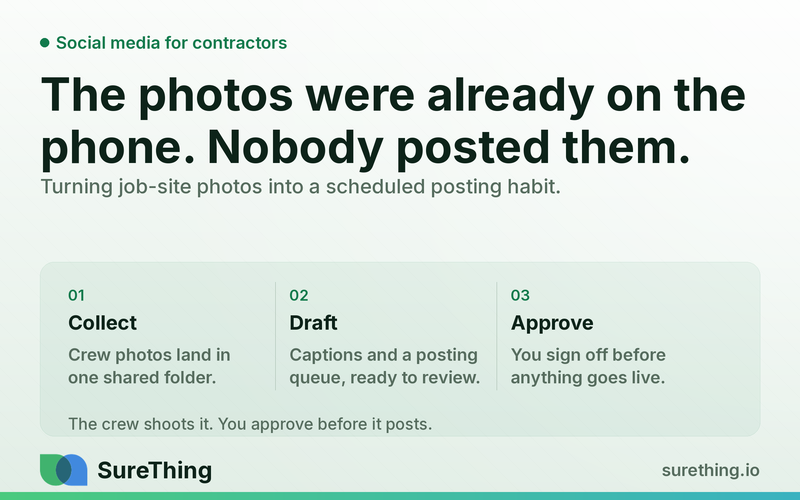
The Short Answer
Social media for contractors works best when it's built on the raw material you already generate every day — job-site photos, before/afters, and finished-project shots — routed through a simple system that drafts captions and schedules posts, so someone just has to approve before anything goes live. You don't need a dedicated marketing hire or an hour a night on your phone; you need a repeatable pipeline from "crew takes a photo" to "post goes out," with you reviewing, not producing, the content.
Key Takeaways
The bottleneck isn't a lack of content — contractors have thousands of usable job photos — it's the missing habit of turning photos into posts on a schedule.
A workflow that starts with crew-submitted photos and ends with owner approval removes the two hardest parts: writing captions and remembering to post.
Consistency matters more than production value; a steady cadence of real job photos outperforms occasional polished campaigns.
Automation should draft and schedule, but a human should always approve before a post goes live, especially anything showing a client's home or property.
Social content and local search work together — social proof feeds trust signals that support the kind of visibility discussed in local SEO strategies for contractors, but the two are separate systems and shouldn't be confused.
The right setup treats social posting as a standing weekly routine, not a project you restart every few months.
The Real Bottleneck: You Have the Content, Not the Habit
Almost every contractor we talk to has the same problem, and it isn't a content problem. It's a workflow problem. A roofing crew finishes a tear-off and re-shingle, someone snaps a few photos on their phone before loading the truck, and those photos sit in a camera roll or a group text forever. An HVAC tech swaps out a failing unit and takes a "before" shot out of habit, then forgets the "after" shot because the customer is standing right there waiting to pay. A remodeling crew wraps a kitchen and the only photo that exists is a blurry one someone took to text the homeowner "all done."
None of that photo material ever becomes a post. Not because the owner doesn't understand social media matters, but because turning a photo into a caption, picking a platform, resizing it, and actually hitting publish requires sitting down, thinking about wording, and doing it at a moment when there are fifty other things demanding attention. Most contractors don't lack raw material. They lack a repeatable path from "photo exists" to "post is live," and they lack the fifteen minutes a day it would take to build that path manually, day after day, for months.
This is different from the local search problem covered elsewhere — getting found in Google Business Profile and local map results is about visibility when someone actively searches for a contractor near them. Social media is about staying visible to people who already know you, or who see your work shared by someone who does. Both matter, but they solve different problems, and neither one fixes the other. A contractor with a great Google profile but a dead Instagram is still leaving referral-driven trust on the table.
The other bottleneck is decision fatigue. Even owners who are willing to post get stuck deciding which photo, which platform, and what to say. When that decision has to be made from scratch every single time, it never becomes a habit — it becomes a chore that gets skipped the first busy week, and busy weeks are the norm in this business. The fix isn't "try harder to post more." It's removing the parts of the process that require a fresh decision every time, so the only decision left is a quick yes or no on something already drafted.
A Workflow That Turns Job-Site Photos Into a Posting Habit
Here's what a workable, sustainable version of this actually looks like, broken into the parts that matter: what kicks it off, what gets checked, what gets drafted automatically, where a person steps in, and how it keeps running without becoming another task on someone's plate.
Trigger
The trigger is the event that starts the pipeline, and for a contractor, it should be as close to "zero extra effort" as possible. That usually means one of a few things: a crew member drops photos into a shared folder or messaging channel at the end of a job, a project management or job-tracking tool marks a job as "complete," or the owner forwards a batch of photos from their phone once a week. The point is that the trigger fits into work that's already happening — nobody is asked to open a new app or fill out a form they'll forget about by Thursday. If a crew already texts photos to the office for invoicing or documentation purposes, that same habit becomes the trigger for the content pipeline too.
Read
Once photos land, the agent's job is to look at what it has before doing anything with it. That means checking which job the photos belong to, whether there's a before-and-after pair or just a single finished shot, whether the image quality is usable (not too dark, not too blurry, no faces or license plates that shouldn't be public), and pulling any context available — job type, service performed, rough location like neighborhood or city rather than a full address. It can also check what's already been posted recently so it doesn't repeat the same angle two weeks in a row, and it can note which platforms haven't had activity in a while so nothing goes stale. This is the same category of "check before acting" behavior described in how small businesses are using AI agents day to day — read first, then act, rather than acting blind.
Does
With that context, the agent drafts. For each usable photo or photo pair, it writes a caption suited to the platform — a short, punchy version for Instagram or Facebook, a slightly more descriptive one for a business page post, maybe a simple before/after callout for a Nextdoor-style neighborhood post. It picks reasonable hashtags for the trade and area, suggests a posting time based on when the account's audience tends to be active, and lines up a draft schedule so posts aren't dumped all at once or forgotten for a month. It can also flag which jobs would make especially strong before/after content — a full kitchen gut, a roof replacement with a clear damage shot, a panel upgrade with visible old wiring — versus routine maintenance work that's fine as filler content but not the lead post of the week. None of this requires the owner to write a single word; it just requires photos to review.
Nod
Nothing goes live without a human looking at it first. This is the step that makes the whole thing trustworthy rather than risky: the owner (or whoever's designated) gets a short queue of drafted posts — photo, caption, platform, suggested time — and can approve, tweak the wording, swap the photo, or hold it back entirely. This matters more in this trade than in most, because job-site photos sometimes include a client's house number, a car in the driveway, or a family photo visible through a window that shouldn't be shared publicly. A human glance catches that in seconds. The approval step is also where the owner's actual voice comes through — maybe they want to add a personal note about a tricky repair, or hold back a post until a customer has confirmed they're comfortable being featured. Automation drafts; a person still decides what represents the business.
Routine
The last piece is what makes this a habit instead of a one-time project. Once the trigger, read, and draft steps are running, the posting turns into a standing weekly or twice-weekly rhythm — a batch of drafts shows up for review every Monday morning or every Friday afternoon, tied to whatever cadence fits how often jobs wrap up. Instead of "post something on social media" living as a vague, always-postponed to-do, it becomes a five-minute review session that happens at the same time every week, the same way payroll or invoicing does. That's the actual unlock: not fancier content, just a schedule that doesn't depend on someone remembering to start from scratch. This kind of standing cadence is exactly what's described in more general terms in the social media automation agent overview, applied specifically to the photo-heavy, time-poor reality of field service work.
Manual vs. Automated: What Actually Changes
It helps to see the difference side by side, not as a sales pitch but as a plain description of where the time and risk actually sit in each approach.
Task | Manual approach | Automated workflow with approval |
|---|---|---|
Turning a finished-job photo into a post | Owner remembers, opens phone, writes caption from scratch, picks a platform, posts (or forgets) | Photo is read, caption and platform are drafted automatically, owner approves or edits in seconds |
Posting cadence | Bursts of activity after a slow week, then silence for a month | Steady drip of drafts on a set schedule, held to a routine review time |
Cross-platform coverage | Usually just one platform gets attention, others go stale | Drafts prepared for each active platform with wording suited to each |
Photo vetting for privacy/appropriateness | Inconsistent — depends on whoever posts remembering to check | Flagged during the read step, still confirmed by a human before publish |
Time cost per week | Hours, spread unpredictably, often skipped entirely | A short, scheduled review session, roughly the same time each week |
Where the Line Should Be
Automation earns trust by being honest about its own limits, especially in a business where photos show real people's homes and real project outcomes. Here's how the line should be drawn.
Can run unattended
Reading incoming photos and sorting them by job, drafting caption options, suggesting hashtags and posting times, checking which platforms haven't posted recently, and queuing draft content for review can all run without someone watching over it. This is the housekeeping layer — useful, low-risk, and exactly the kind of repetitive work that shouldn't eat into a contractor's evening.
Needs a human nod
Every actual post going live needs a person's approval — checking the photo doesn't reveal something it shouldn't, confirming the caption sounds like the business and not a generic template, and making the final call on timing if something in the schedule (a bad review, a community issue, a competitor's news) makes a particular week feel like the wrong moment to post routine content. Responding to comments that raise a complaint or a service question should also route to a person rather than an auto-reply, since those often need specifics only the owner or office staff would know.
Should never be automated
Anything that touches a customer's private information, project pricing details, or specifics of a dispute should stay off autopilot entirely. Photos or captions implying guarantees about workmanship, code compliance, or safety outcomes shouldn't be posted without a knowledgeable person checking the wording — that's a legal and liability question, not a content question, and it deserves a real conversation with whoever handles the business's insurance and licensing obligations, not an AI-drafted caption. The same goes for anything that could be read as advice about permits, code requirements, or safety — that's a conversation for a licensed professional, not a social post.
FAQ: Social Media for Contractors
Do I need to be on every platform?
No. Most contractors get more value from posting consistently on one or two platforms where their past customers and neighborhood referrals actually spend time — often Facebook and Instagram, sometimes Nextdoor for hyper-local work — than from spreading thin drafts across five accounts nobody checks.
What if my crew doesn't take good photos?
A quick before-and-after habit matters more than photography skill. Two clear phone shots — one before the work starts, one after it's done, taken from roughly the same angle — give more usable content than a dozen random mid-job snapshots. Many field service businesses find that comparing automation tools built for consistent posting is less important than simply building the photo habit on-site first.
How much time does this actually save?
The biggest saving isn't in the minutes per post, it's in never having to start from a blank screen. Reviewing a drafted post and approving it takes well under a minute; writing one from scratch, including deciding what to say and finding the right photo, tends to take much longer and gets skipped more often as a result.
Should I show my pricing or project cost in posts?
Generally no, unless that's a deliberate business decision made with full knowledge of how competitors and customers in your market will react. Pricing specifics are better handled in direct conversations with customers, not in public captions, and this is a decision for the owner, not something to leave to a draft.
Can this replace hiring a social media person?
For most single-crew or small multi-crew contractors, this workflow covers the bulk of what a part-time social hire would do — turning existing photos into scheduled posts — without the added payroll. As the business grows and wants original video content, paid ad management, or brand strategy, that's when a dedicated hire or agency starts to add value beyond what a drafting workflow can.
Building the Habit, One Approved Post at a Time
None of this requires a marketing degree or a content calendar spreadsheet you'll abandon in three weeks. It requires a system that takes the photos your crew is already taking, drafts something reasonable to say about them, and puts a short review in front of you on a schedule you actually keep. Contractors who've made this work usually didn't start with a big campaign — they started by letting one week's worth of job photos turn into drafted posts, approving what looked right, and letting that small routine repeat. Research on how home service businesses use social platforms to build local trust generally points the same direction: steady, authentic project content outperforms sporadic polished campaigns, and consistency is the harder part to solve, not creativity. Separate industry surveys on small business owners' own accounts of time constraints back up what most contractors already feel — the barrier isn't interest, it's time.
If you're weighing where to start, the rundown of AI agents small businesses are actually using is a reasonable place to see how this kind of drafting-and-approval pattern fits alongside other day-to-day tasks, not just social posts. And if the idea of turning this week's job photos into next week's scheduled content sounds like something worth trying rather than something to overhaul your whole marketing plan for, that's really all it takes to start — a few photos, a batch of drafts, and a quick nod before anything goes out.