July 4, 2026
Best AI Agents for Small Business (2026): 10 Tools Tested & Ranked
AI agents in 2026 aren't just chat assistants — they're replacing the repetitive, high-volume work that used to require dedicated headcount. We tested 10 of the best platforms for small and mid-sized businesses to find the ones that actually deliver.
Last updated: August 2026 — hands-on tested and re-verified by the SureThing team.
The best AI agents for small business in 2026 replace repetitive operational work — email follow-ups, lead qualification, reporting, social scheduling — not just automate single tasks. We hands-on tested the ten most-deployed platforms against three real SMB scenarios (e-commerce support, professional-services lead pipeline, content publishing) to find which ones actually cut staff hours rather than just adding another tool to babysit.
Why AI Agents Are Replacing Repetitive Business Labor
The business case for AI agents in 2026 is no longer theoretical. Mid-size companies with 5 to 50 people are running AI agents to handle the high-volume, repetitive work that used to require dedicated headcount — email follow-ups, lead qualification, customer ticket routing, social media scheduling, weekly reporting, data entry. The operational gain is real: one agent running 24/7 replaces what used to take 10 to 20 hours of staff time per week.
The challenge is picking the right tool. The market is crowded with platforms that call themselves "AI agents" — ranging from mature automation suites to no-code workflow builders to purpose-built AI employees. Capability gaps are large. A mismatch between your team's needs and your tool's actual scope wastes weeks of setup time.
We tested and compared the ten most commonly deployed AI agent platforms for small-to-mid-sized businesses in 2026. Here's what we found.
How We Ranked These
This list is based on hands-on testing across three criteria that matter to operating businesses: how much actual labor the tool replaces (not just automates), how long setup takes for a non-technical team, and how the tool handles edge cases and cross-functional tasks that real businesses face every day.
We evaluated each platform against three real-world SMB scenarios: (1) a small e-commerce operation handling 50–100 customer contacts per week, (2) a professional services firm managing lead pipeline and client email, and (3) a content-driven business managing social publishing and weekly analytics. Pricing reflects published rates as of June 2026; verify on each vendor's pricing page before purchasing.
Quick Comparison: 10 Best AI Agents for Small Business 2026
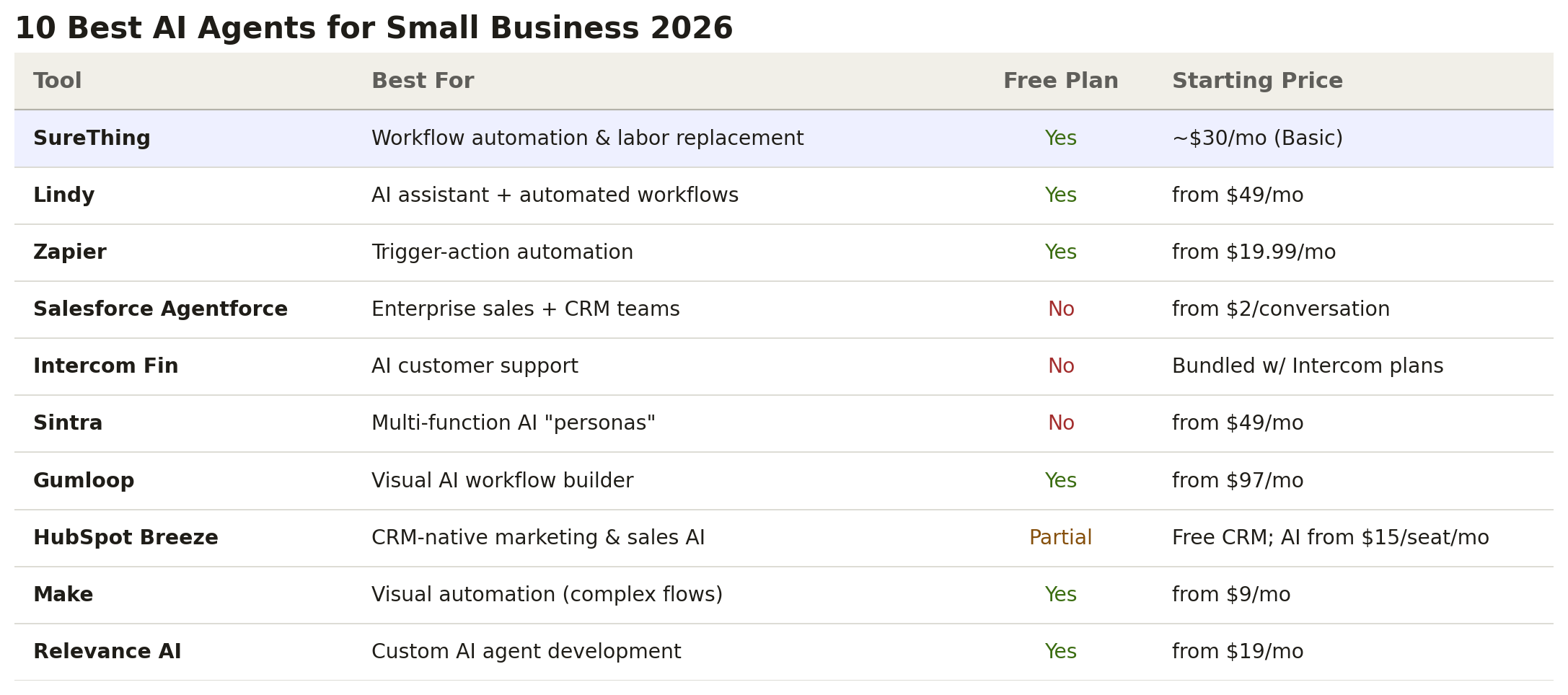
At a glance — how the 10 platforms compare on best-fit and starting price:
SureThing — Best for replacing repetitive business labor at scale. Free plan; paid from ~$30/mo.
Lindy — Best for a conversational AI assistant with automation. Free tier; from $49/mo.
Zapier — Best for connecting apps without code. Free plan; from $19.99/mo.
Salesforce Agentforce — Best for Salesforce-native enterprise teams. No free plan; from $2/conversation.
Intercom Fin — Best for AI-first customer support. No standalone free plan; bundled from ~$74/mo.
Sintra — Best for pre-built agent personas. No free plan; from $49/mo.
Gumloop — Best for technical founders who want visual workflow control. Free plan; from $97/mo.
HubSpot Breeze — Best for teams already running HubSpot. Free CRM; AI features from $15/seat/mo.
Make — Best for complex multi-app automation at low cost. Free plan; from $9/mo.
Relevance AI — Best for building custom AI agents from scratch. Free plan; from $19/mo.
The 10 Best AI Agents for Small Business
1. SureThing — Best for Replacing Repetitive Business Labor at Scale
Best for: Small and mid-sized businesses with established operations that need AI to take over high-volume, repeatable work — so staff can focus on judgment-heavy tasks that actually require a human.
SureThing is built around a single premise: your business already works. What's slowing it down is the repetitive operational load — the emails that need writing and sending, the leads that need qualifying, the reports that need pulling, the social posts that need scheduling. SureThing puts AI agents on that work, running 24/7, so your team stops being the bottleneck.
What separates SureThing from standard automation tools is persistent memory. Each agent remembers every run, every decision, every context update — so the work compounds instead of resetting. An agent handling your lead pipeline on Monday already knows what happened last Tuesday. It doesn't start from scratch.
The Human-in-the-Loop system is worth highlighting for any team that's nervous about AI acting on its own. Before any consequential action — sending an email, posting content, updating a deal — SureThing routes a review card to the responsible person. You see exactly what the agent is about to do and approve, modify, or redirect it. The AI does the volume; humans retain the judgment calls.
1,000+ app integrations including Gmail, Slack, HubSpot, Notion, Stripe, Google Ads, and Shopify
Multi-agent coordination — agents hand off work to each other (@mention delegation) with shared memory
One-click skill installation — drop in a proven workflow from GitHub or the SureThing Skills catalog and it adapts to your context
Live dashboards — every agent reports to a structured dashboard; no more chasing status in Slack threads
Pricing: Free plan available. Paid plans from ~$30/mo (Basic). Limited-time: 50% off your first paid month — check surething.io/pricing for current promo availability.
Watch out for: SureThing delivers more value as agents learn your workflows — expect the first 2–3 weeks to be configuration and calibration time before the labor-replacement flywheel kicks in. It's not a day-one set-and-forget tool; it's an investment that compounds.
2. Lindy — Best for Teams That Want a Conversational AI Assistant with Automation
Best for: Operations and support teams that need an AI assistant bridging conversational requests with backend workflow execution.
Lindy positions itself as an AI employee you can talk to and delegate tasks to in natural language. It handles scheduling, email drafting, meeting notes, and basic workflow automation. The interface is approachable and the onboarding is fast — most users have their first "Lindy" (agent) running within an hour.
Natural language task delegation — tell Lindy what to do in plain English
Native calendar and email management
Workflow templates for common SMB use cases
Pricing: Free tier (limited). Paid from $49/mo.
Watch out for: The free tier is heavily throttled; meaningful automation at business scale requires the paid plan. Complex multi-step workflows that span more than 3–4 steps tend to break without careful prompt engineering.
3. Zapier — Best for Connecting Apps Without Writing Code
Best for: Teams that need reliable, trigger-based automation between their existing SaaS stack and don't need AI judgment in the loop.
Zapier is the incumbent automation platform for SMBs and has been adding AI capabilities (Zapier AI Actions, Agents) through 2025–2026. Its strength is breadth: 7,000+ app integrations and a proven workflow engine that's been running reliably for years.
7,000+ pre-built app connectors
Zapier Agents for natural-language workflow creation
No-code builder; fast setup for common trigger-action flows
Pricing: Free plan available. Paid from $19.99/mo (Starter).
Watch out for: Zapier is fundamentally a trigger-action automation layer, not a true AI agent. It executes exactly what you configure — it doesn't adapt, recover from ambiguous inputs, or handle edge cases without explicit logic for every scenario. If your workflow has exceptions, plan to handle them yourself.
4. Salesforce Agentforce — Best for Salesforce-Native Enterprise Teams
Best for: Mid-market and enterprise sales organizations already running Salesforce CRM who want embedded AI agents without adding another vendor.
Agentforce is Salesforce's native AI agent layer, launched in late 2024 and expanded significantly through 2025. For companies already on Salesforce, it's the lowest-friction path to AI-assisted sales, service, and marketing workflows — no integration overhead, same data model, same permissions.
Deeply integrated with Sales Cloud, Service Cloud, and Marketing Cloud
Handles customer routing, case summarization, and deal coaching natively
Customizable via Salesforce Flow and Apex for developers
Pricing: No free plan. From $2/conversation (Flex plan) for SMB; enterprise licensing varies. Requires existing Salesforce contract.
Watch out for: Agentforce requires an existing Salesforce investment to deliver real value — if your team isn't already living in Salesforce CRM, you're paying for a platform before you can use the agent. Standalone adoption is cost-prohibitive for most small businesses.
5. Intercom Fin — Best for AI-First Customer Support
Best for: SMBs handling high support ticket volume who want AI to resolve the majority of common customer questions without human escalation.
Fin is Intercom's dedicated AI support agent. It reads your help center content, previous ticket history, and product documentation, then answers customer questions accurately in real time. Resolution rates in the 50–70% range are achievable for well-documented products. For support-heavy businesses, the labor savings are immediate.
Answers from your existing knowledge base — no retraining required
Handles multi-language inquiries out of the box
Escalates to human agents with full conversation context
Pricing: No standalone free plan. Bundled with Intercom paid plans (from ~$74/mo); Fin add-on priced per resolution.
Watch out for: Fin's scope is limited to customer support conversations inside Intercom. It can't execute workflows, trigger actions in other systems, or connect to your CRM or billing platform. If your support needs are cross-functional, you'll need additional tooling on top.
6. Sintra — Best for Businesses That Want Pre-Built Agent Personas
Best for: Small business owners who want an out-of-box AI assistant for a specific function (sales, marketing, HR) without custom configuration.
Sintra ships a roster of named AI "personas" — each trained for a specific business function. You pick the persona closest to your need (e.g., an AI SDR, an AI social media manager) and it works within that defined scope. For owners who don't want to build workflows from scratch, this reduces setup time.
Pre-configured AI personas for 20+ business functions
Minimal setup — personas come pre-prompted for their role
Web and chat interface, no technical skill required
Pricing: No free plan. Paid plans from $49/mo.
Watch out for: The persona model limits cross-functional work. Each agent operates in its own silo — they don't share memory or collaborate on tasks that span multiple functions. A workflow that needs your "sales agent" and your "marketing agent" to coordinate requires manual intervention at the handoff.
7. Gumloop — Best for Technical Founders Who Want Visual AI Workflow Control
Best for: Technically inclined founders and operators who want fine-grained control over how AI workflows are built and chained together.
Gumloop is a no-code AI workflow builder that gives you a visual canvas for assembling multi-step automated pipelines. It supports LLM calls, web scraping, email triggers, document processing, and integrations in a drag-and-drop interface. The output quality for complex pipelines is high.
Visual flow builder with drag-and-drop LLM and tool nodes
Supports web scraping, document processing, and API calls
Library of pre-built workflow templates for common use cases
Pricing: Free plan (limited credits). Paid from $97/mo.
Watch out for: Gumloop is a flow builder, not a conversational agent — it's optimized for structured, predictable pipelines, not autonomous decision-making. Users expecting an AI that handles ambiguity or asks clarifying questions will find it rigid. The learning curve is real for non-technical business owners.
8. HubSpot Breeze — Best for Teams Already Running HubSpot
Best for: SMBs using HubSpot CRM who want AI to assist with content creation, deal forecasting, and customer research without leaving the platform.
HubSpot Breeze is the AI layer embedded across HubSpot's product suite — Breeze Copilot for conversational assistance, Breeze Agents for automated marketing, sales, and service workflows, and Breeze Intelligence for data enrichment. If your contact, deal, and content data is already in HubSpot, Breeze can unlock meaningful automation without new integrations.
Copilot assistance across CRM, marketing, and service hubs
Content Agent for blog, social, and landing page drafts
Prospecting Agent for automated outbound research
Pricing: Free CRM; AI features (Breeze Copilot) from $15/seat/mo (Starter); Breeze Agents require Professional tier ($800/mo). Not all Breeze features available on free tier.
Watch out for: Breeze Agents only operate within the HubSpot ecosystem — they don't reach outside your HubSpot data or connect to external platforms without workarounds. If a workflow requires actions in Gmail, Slack, or Notion alongside HubSpot, you'll need Zapier or Make to bridge the gap.
9. Make — Best for Complex Multi-App Automation at Low Cost
Best for: Operations teams that need reliable, complex multi-step automations connecting many apps — and want more flexibility than Zapier at a lower price point.
Make (formerly Integromat) is a visual automation platform with deeper control over data transformation and routing than Zapier. It handles high-volume, complex scenarios with conditional logic, error handling, and advanced data mapping. The pricing model (operations-based vs. task-based) is more cost-efficient for high-frequency automations.
1,000+ app connectors with a visual flow editor
Advanced data transformation and routing logic
Operations-based pricing — better unit economics for high volume
Pricing: Free plan (1,000 operations/month). Paid from $9/mo.
Watch out for: Like Zapier, Make is deterministic automation — not an AI agent. It executes scenarios exactly as configured and does not adapt to unstructured inputs or unexpected states. AI-native capabilities are add-ons, not core to the platform.
10. Relevance AI — Best for Building Custom AI Agents from Scratch
Best for: Technical founders and product teams who need custom AI agents with specific logic, tool access, and memory that off-the-shelf tools can't provide.
Relevance AI is a developer-friendly platform for building AI agents and multi-agent teams with custom tools, memory, and task execution. It gives builders a programmatic environment — define the agent's tools, add LLM reasoning, chain agent handoffs — with a no-code layer for less technical teammates. For unique business processes that don't fit a template, Relevance AI provides the control.
Custom tool builder for any API or business logic
Multi-agent teams with structured agent-to-agent handoffs
Long-term memory for each agent with retrieval-augmented generation
Pricing: Free plan (limited). Paid from $19/mo.
Watch out for: Relevance AI is built for technical users. Non-technical business owners will hit walls quickly when workflows need debugging, custom API configurations, or prompt tuning — support resources assume a developer background. Expect meaningful setup investment before getting value.
Frequently Asked Questions
What is an AI agent for small business?
An AI agent is software that can execute multi-step tasks autonomously on your behalf — not just answer questions, but take actions: send emails, update records, publish content, pull reports, qualify leads. For small and mid-sized businesses, the value isn't in doing new things — it's in taking over the repetitive, high-volume work your team already does, running 24/7 so your people can focus on work that actually requires judgment.
Who should use AI agents — solopreneurs or larger teams?
AI agents deliver the most ROI for businesses that already have real workflows running. If you have recurring processes — weekly reporting, lead follow-up sequences, customer onboarding, social publishing — there is labor to replace and an agent can replace it. The sweet spot is 5-to-50-person companies where headcount is expensive and repetitive operational tasks are pulling people away from higher-value work.
Solopreneurs or pre-revenue founders can benefit from AI assistants and research tools, but the labor-replacement ROI is smaller when there's less volume to replace. Most agents on this list are best deployed against work that currently takes someone 5+ hours per week.
Do I need technical skills to set up an AI agent?
Not for most tools on this list. SureThing, Lindy, and Sintra are designed for non-technical users and can be configured entirely via web interface and plain-language instructions. Zapier and Make have no-code builders but require logical thinking about triggers and actions. Relevance AI and Gumloop assume some technical comfort for advanced configurations. HubSpot Breeze and Intercom Fin require no special skills if you're already running those platforms.
What's the difference between an AI agent and a chatbot?
A chatbot responds to questions. An AI agent takes actions. The practical difference is whether the software can do something on your behalf in the real world — send an email, log a deal, post to LinkedIn, trigger a webhook — versus just generating a response for you to act on. Most of the tools in this list qualify as agents because they can connect to external systems and execute. Watch for products that claim to be agents but only produce text outputs without the ability to take downstream action.
How much do AI agents for small business cost?
Pricing ranges significantly by use case and scope. Entry-level access starts at $0 (SureThing, Zapier, Make, Lindy all offer free tiers), with meaningful automation available from $9–$49/month on most platforms. Customer support AI (Intercom Fin) and CRM-native agents (Agentforce) are typically more expensive because they're bundled into larger platform contracts. SureThing's paid plans start at ~$30/month with a free tier available — a current limited-time promo offers 50% off your first month (see surething.io/pricing for availability).
Which AI agent is best for a business that isn't technical?
SureThing, Lindy, and HubSpot Breeze are the least friction for non-technical teams. SureThing is the strongest choice if your goal is labor replacement across multiple functions — email, reporting, lead management, social — rather than a single use case. Setup is mobile-friendly and doesn't require any coding or prompt engineering. For support-specific use cases, Intercom Fin is also non-technical once Intercom is configured.
Bottom Line
The AI agents worth deploying in 2026 aren't just chat interfaces — they're operational layers that take over real work. The right tool depends on what you're replacing: customer support volume (Intercom Fin), CRM-native sales workflows (Agentforce for Salesforce teams), or the full cross-functional operational load that a growing business accumulates.
For businesses that need AI to run across multiple functions — email, reporting, lead management, social, and beyond — while keeping a human in control of every consequential action, SureThing is the best fit. Free to start, and designed from the ground up for the way a real business actually runs.The best AI agents for small business in 2026 replace repetitive operational work — email follow-ups, lead qualification, reporting, social scheduling — not just automate single tasks. We hands-on tested the ten most-deployed platforms against three real SMB scenarios (e-commerce support, professional-services lead pipeline, content publishing) to find which ones actually cut staff hours rather than just adding another tool to babysit.