September 9, 2026
Can AI Reply to Customer Messages? Where the Boundary Actually Sits
AI can triage and draft replies to customer messages across email, chat, and DMs - and send the low-stakes ones outright. The line sits at refunds, promises, and angry customers, where a human has to nod first.
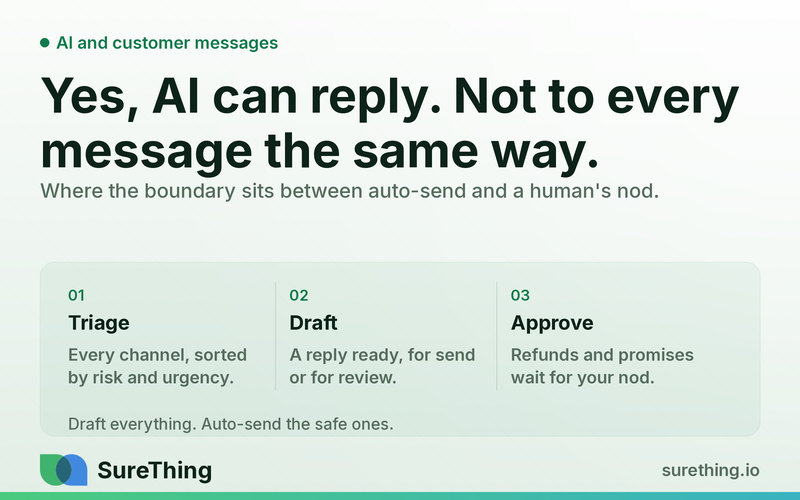
Yes, AI can reply to customer messages, but not all messages, and not without a boundary. An AI agent can read incoming emails, web chat, and social DMs, sort them by urgency and type, and draft (or in low-risk cases send) responses automatically. The line sits at anything involving money, a promise, or an already-upset customer - that's where a human needs to nod before the message goes out.
Key Takeaways
AI can triage and draft replies to customer messages across email, web chat, and social DMs 24/7, cutting the time a message sits unanswered.
Routine questions - hours, order status, "do you serve my area," basic pricing - can often be answered by an agent without a human touching it first.
Anything with a refund, a discount, a promise ("we'll fix it for free"), or a visibly angry customer needs a human approval step before it's sent.
The real bottleneck isn't whether AI can write a reply - it's whether the owner trusts what it writes enough to stop reading every single one.
A workable setup drafts everything and auto-sends only the low-stakes categories, with a fast approval queue for the rest.
Getting this right is less about picking a tool and more about defining, in writing, which categories are "safe" and which aren't.
The Real Bottleneck: It's Not Speed, It's Trust
Every small business owner who's looked at an AI reply tool has had the same reaction: "This could save me hours a week." That part is true. The harder problem is the one nobody markets: once an AI agent can draft a reply in your voice, how do you decide which replies it's allowed to send without you seeing them first?
Most owners solve this the wrong way at first. They either turn on full automation and get burned by one bad reply to an angry customer, or they turn on nothing and read every single draft anyway - which means they've just added a review step to their existing workload instead of removing one. Neither is the actual fix. The fix is separating messages by risk before you decide how much autonomy to give the agent.
This is different from the lead-follow-up problem, where the goal is getting an unresponsive prospect to respond at all. Here, the customer has already messaged you - the question is purely about what happens between their message landing and your reply going out, and how much of that gap AI can close on its own.
The Workflow: How AI Handles an Inbound Customer Message
Trigger
The workflow starts the moment a message hits any channel you've connected - a new email to your support or info inbox, a web chat message on your site, a comment or DM on a social profile, or a message through a review platform. The trigger is channel-agnostic: the agent should be watching all of them, not just the one you happen to check most often.
Read
Before drafting anything, the agent reads the message alongside context: prior conversation history with that customer, order or appointment details if connected, your FAQ or policy doc, and the tone of the message itself. This is where triage actually happens - the agent is classifying the message (question, complaint, request for a promise/refund/exception, spam) before it decides what to do next. It's also checking whether this is a first contact or part of an ongoing thread, since an angry follow-up reads very differently from a first-time question.
Does
Based on that read, the agent drafts a response. For straightforward categories - hours, location, availability, "how does this work," basic pricing that's already published - it can draft a reply ready to send, and in many setups, send it directly. For anything with more nuance, it drafts the reply but holds it. It can also pull in supporting detail on its own: checking your service area against a contractor's coverage map, referencing your current promotions, or noting that a similar question came up three times this week and flagging it as worth adding to your FAQ. None of this requires the owner to be at their desk.
Nod
This is the approval checkpoint, and it's the part that actually matters. Any reply that includes a refund amount, a price exception, a specific promise ("we'll redo it at no charge," "you'll have it by Friday"), or that's responding to a customer who's clearly frustrated or escalating, gets queued for a human to read and approve - or edit - before it sends. The agent still does the work of drafting a reasonable first pass; it just doesn't get the last word. A five-second approve/edit tap is a very different workload than writing the reply from scratch.
Routine
Once the categories are defined, this becomes a standing habit rather than a project. Messages get triaged and drafted continuously through the day; the owner checks an approval queue once or twice a day instead of monitoring three inboxes constantly. Weekly, it's worth a quick scan of what got auto-sent versus what got escalated, to catch any category that should move from one bucket to the other. Tools built for this - including the agents inside a broader set of AI agents built for small business owners - are meant to run this way by default: draft-first, escalate on risk, and get quieter over time as you tune the categories, not louder.
Manual vs. AI-Assisted Reply Handling
Situation | Manual (Owner Handles Everything) | AI-Assisted (Draft + Selective Auto-Send) |
|---|---|---|
Basic question (hours, location, pricing) | Owner replies when they next check the inbox - could be hours later | Agent drafts or sends immediately, any time of day |
Order/appointment status check | Owner looks up the record, types a reply manually | Agent checks the record and drafts a status reply for send or quick approval |
Refund or price exception request | Owner writes the reply and decides the terms on the spot | Agent drafts a response with reasonable terms; owner approves or edits before send |
Angry or escalating customer | Owner reads the full thread and composes a careful reply, often stressed and rushed | Agent drafts a calm first pass and flags urgency; owner reviews before anything goes out |
Message volume across email, chat, and DMs | Owner checks multiple inboxes separately throughout the day | Agent triages all channels into one queue, sorted by what needs attention first |
Where the Boundary Actually Sits
What can run unattended
Factual, low-stakes replies that don't involve money changing hands or a promise being made: hours, location, parking, what you sell, published pricing, order or appointment confirmations, basic availability, and answers pulled directly from a policy or FAQ document. These are the messages where a wrong tone costs you almost nothing, because there's no ambiguity in the answer.
What needs a human nod
Anything involving a refund, a discount, a price exception, a specific promise about timing or outcome, or a customer who's frustrated, upset, or threatening to leave a bad review. This also includes any message where the agent isn't confident it read the situation correctly - a good setup lets the agent flag its own uncertainty rather than guess. The draft still gets written; a person just has to look at it before it's sent. This is also where a business's reputation on public channels is at stake, which connects to the review-monitoring and local-visibility work covered in local SEO guidance for contractors - a bad public reply can undo months of review-building in one thread.
What should never be automated
Anything that amounts to legal, tax, medical, or insurance advice given to a customer under your business name should never be drafted or sent as if it's a definitive answer - that's true even if a customer asks directly, and it's true regardless of how confident the agent's draft sounds. If a message veers into "should I sue," "is this covered," or "what should I claim," the right automated response is to route it to a human and, where appropriate, suggest the customer speak with the relevant licensed professional - not to answer the question. The same caution applies to any message that could create a binding commitment your business can't actually honor.
Setting the Categories: A One-Week Starting Point
Most of the friction in getting this right isn't technical - it's deciding, in writing, what counts as "safe to auto-send" for your specific business. A workable way to start is to spend the first week doing nothing but watching. Let the agent draft a reply to every inbound message, but hold every single one for your approval, and pay attention to which drafts you approve without changing a word versus which ones you edit or reject. That pattern is the actual answer to "what can this handle," not a generic checklist someone else wrote.
By the end of that week, most owners find that somewhere between a third and half of their message volume falls into a small number of repeatable categories - the same three or four questions asked in slightly different words. Those become the first auto-send list. Everything else stays in the approval queue, and you revisit the split again after another week or two, once you've seen a larger sample of what actually shows up. This staged approach avoids the two failure modes described earlier: it doesn't hand over control before you've seen the pattern, and it doesn't leave you reading every draft indefinitely either.
It's also worth deciding upfront who else, besides the owner, is allowed to approve a queued reply. A single-person approval queue is fine for a solo operator, but if a manager or front-desk staff member also has customer contact, giving them the same approve/edit access - with the same boundary rules - keeps the system from becoming a bottleneck that only works when one specific person is available.
FAQ
Can AI actually write replies that sound like me, not a robot?
Reasonably well, if it's given examples of how you actually write - past replies, your tone in emails, your FAQ language. Drafts still benefit from a quick human glance early on so you can correct anything that feels off before it becomes a pattern.
What happens if the AI misreads an angry message as neutral?
This is why tone and escalation flagging matters more than grammar. A well-configured agent errs toward caution - if it's unsure, it should route to a human rather than guess, since a slightly slower reply is far cheaper than a mishandled complaint. Research on customer service response times generally supports the idea that speed matters, but not at the cost of getting a sensitive reply wrong, as reflected in industry data on customer expectations for response time.
Do I need separate tools for email, web chat, and social DMs?
Not necessarily - one of the practical wins of a unified agent setup is pulling all three into a single triage view instead of checking three separate places. Some of that overlaps with broader social workflows, like the ones covered in social media automation for small businesses and this comparison of social media automation tools, though replying to inbound DMs is a narrower job than managing a posting calendar.
How much time does this actually save if I still have to approve half the replies?
The time savings come mostly from not having to compose the reply from scratch and not having every message sit in an unread inbox for hours. Approving a drafted reply takes seconds; writing one from a blank screen, especially for a complaint, takes real mental effort - and small business owners report that response speed itself affects whether a customer sticks around, a point reinforced by general research on how response speed affects customer retention.
What's the first category I should let AI handle without approval?
Start with the messages where the answer never changes - hours, location, what you offer, basic order status. There's no ambiguity, so there's very little downside to letting those go out automatically while you keep everything else in the approval queue.
Where to Go From Here
The honest answer to "can AI reply to customer messages" is that it can handle more of the load than most owners assume, but the value isn't in removing you from the conversation - it's in only pulling you in when it actually matters. Getting the categories right, even roughly, up front, is what separates an agent that saves real time from one you have to babysit. If you're weighing options, it's worth looking at how different agent setups handle this kind of triage and drafting work before deciding how much you want automated versus approved. There's no need to flip every switch on day one - most businesses find their footing by automating the obvious, low-risk replies first and expanding from there as they see what the agent gets right.