September 7, 2026
Workflow Automation for Small Business: The Diagnostic Before the Tool
Most workflow automation fails because the process was never written down, not because the tool was wrong. The four-column diagnostic that finds the right first task to automate, and the runnable loop that follows.
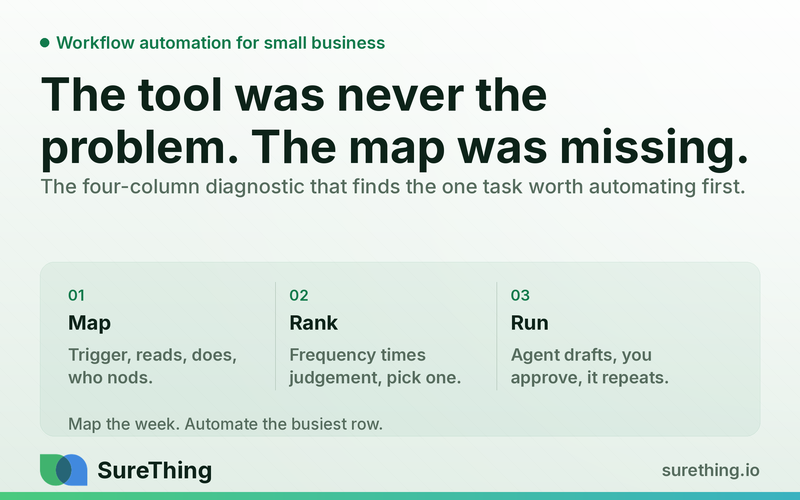
Key Takeaways
Most small businesses that "tried automation and it didn't work" never had a step wrong — they had a process that was never written down, so nothing was clear enough to automate in the first place.
The fix is a diagnostic, not a tool purchase: write down what actually happens in a week as a trigger, what gets read, what gets done, and who has to say yes — before deciding what runs itself.
Rank candidate tasks by how often they happen times how much judgement they need. High frequency, low judgement is the first thing worth automating; low frequency, high judgement should stay manual regardless of how tedious it feels.
An agent-based approach — read the trigger, draft the action, wait for a human nod — fits the tasks that repeat constantly but still need a person to catch the exceptions.
The goal of the first automation is not to remove a person from a process. It is to remove the part of the week that person spends waiting, re-typing, or chasing.
The Short Answer
Workflow automation for a small business does not start with software. It starts with writing down, honestly, what happens between a customer doing something and the business responding to it — because most owners cannot answer that question precisely, and a process nobody can describe cannot be automated well. The businesses that get real value from automation are the ones that spend an afternoon mapping their actual week into four columns — what triggers the work, what needs to be read before acting, what the action actually is, and who has to approve it — and then automate the one row where the same simple decision repeats dozens of times a week. This article is that diagnostic, plus the runnable loop that follows once the first candidate is chosen.
Why "We Automated X and It Didn't Help" Keeps Happening
The pattern is familiar. A business signs up for a tool, connects it to email or a form, and within a month either abandons it or lets it run quietly doing something nobody checks anymore. The tool is rarely the problem. Business process management treats a company's processes as important organizational assets that must be understood, managed, and continuously improved — and "understood" is the word that gets skipped. Most owners can describe their business in terms of outcomes (we book appointments, we send invoices, we follow up on quotes) but not in terms of the actual sequence of triggers and decisions that produces those outcomes. Automation applied to an outcome fails, because an outcome is not a process. Automation applied to a described sequence of steps works, because there is something concrete to hand to software.
There is a related failure mode worth naming directly: automating the wrong end of the process. A business automates the sending of a follow-up email, but the actual bottleneck was deciding which quote was worth following up on. The email was never the bottleneck — someone still has to make the judgement call, and now there is an extra automated email sitting on top of an unsolved problem. This is why the mapping step below asks not just "what happens" but "where does a decision actually get made," because that is the step worth protecting, not automating away.
The Four-Column Diagnostic
Before touching any tool, write the actual week down. Not the ideal week — the real one, including the parts that feel too obvious to mention. Four columns, one row per recurring task:
Trigger — the concrete event that starts the work. A form submission, an email arriving, an invoice going seven days unpaid, a calendar date. Not "when we need to," but the exact thing that happens first.
Reads — what has to be checked before acting. The customer's history, the calendar, the current stock level, last month's numbers. This is the context a person currently holds in their head, and it is the column most owners forget to write down, because it feels automatic to them.
Does — the actual action. Sends a reply, drafts an invoice, updates a spreadsheet, books a slot. Write it as specifically as the trigger — "replies with next available times," not "follows up."
Nods — who has to say yes, and why. Sometimes nobody does (a receipt confirmation). Sometimes it is one glance before sending (a client-facing message). Sometimes it is a real judgement call that cannot be delegated (a refund, a legal commitment, a price exception).
The value of this exercise is almost never in the automation it produces immediately. It is in what the four columns reveal about where time actually goes — which is usually not where the owner assumed. Business process discovery techniques construct a representation of an organization's current processes from records of how work actually happens, precisely because the process people describe from memory and the process they actually run tend to diverge, and the gap is where the waste hides.
A worked row makes the exercise concrete. Take "a lead asks about pricing by email." Trigger: an email containing a pricing question arrives. Reads: whether this address has contacted the business before, and which service page, if any, they came from. Does: sends the price sheet for the service they asked about, with one sentence acknowledging what they specifically asked. Nods: a quick glance before the first reply to any new sender, no review needed for a repeat sender getting the same price sheet again. Written this precisely, the row is no longer a vague "handle pricing inquiries" — it is a specific, testable sequence a person can check an agent's draft against.
Ranking Candidates: Frequency Times Judgement
Once the rows exist, rank them on two axes: how often the trigger fires per week, and how much real judgement the "does" step requires. A task that fires fifteen times a week and only ever requires the same simple response — confirm receipt, offer the next open slot, remind about an unpaid invoice — is the strongest candidate, because the automation pays for its setup cost fast and the risk of a wrong call is low. A task that fires twice a month and depends on reading a client's whole history and mood is the weakest candidate, no matter how tedious it feels in the moment, because getting it wrong costs more than the time saved.
Most small businesses find their best first candidate is something that felt too small to matter: the fifth time this week someone asked "are you open Saturday," the standard reply to a quote request that needs a price sheet attached, the reminder that goes out to every client three days before an appointment. None of these individually feel like "workflow automation." Collectively, across a week, they are usually the largest chunk of low-value repeated effort in the business — which is exactly what makes them the right place to start.
The Runnable Loop
Trigger: the event that starts the row, exactly as written down
Not a person deciding to check something — the event itself. A form submits, an email lands, a date arrives, a threshold is crossed.
Read: only what that row's "reads" column actually named
The agent pulls the specific context that row needs — the calendar, the customer record, the price list, the current queue — and nothing beyond it. Scope stays tight to what a person currently checks before acting on that exact task.
Draft: the action, written out, not sent
The agent produces the reply, the invoice, the update — in the same form a person would produce it, specific to the actual trigger rather than a generic template.
Nod: whatever the "nods" column said, applied consistently
If the row's judgement level is low, the nod can be a light spot-check on a batch rather than each item individually. If it is a client-facing first message or anything with financial exposure, every draft gets reviewed before it goes out. The column decided this before any code was written — the automation just enforces it consistently, which is often an improvement over what a busy week actually delivers.
Routine: it runs without anyone remembering to start it
Once approved, the same trigger keeps producing the same drafted action every time it fires, with the same review checkpoint every time — no version of "we usually do this but forgot this week."
What Runs Alone, What Waits for a Nod, What Never Automates
Task | Automation level | Why |
|---|---|---|
Detecting the trigger (form, email, date, threshold) | Unattended | Pure observation, no outbound action |
Pulling the specific context a row's "reads" column names | Unattended | Read-only; makes every downstream draft more accurate |
Drafting a routine, low-judgement reply (hours, availability, confirmations) | Unattended draft, light batch review | High frequency, low risk if occasionally imperfect |
Drafting a client-facing first message or anything with a price attached | Unattended draft, individual review | Sets tone or carries financial exposure — worth a human glance every time |
Sending reminders on an already-agreed schedule | Unattended after setup | Logistics on an existing commitment, low downside |
Deciding a refund, discount, or exception to stated policy | Human only | A real judgement call with financial and relationship consequences |
Anything touching legal, tax, or regulatory commitments | Never automated | Outside what software should decide for the business |
Making the First Automation Stick
Pick exactly one row from the ranked list — the highest frequency, lowest judgement candidate — and run it for two weeks before touching a second one. The temptation after mapping a whole week's process is to automate everything the map revealed at once; resist it. The two-week window with one process is what tells you whether the "reads" column was actually complete, whether the review checkpoint is set at the right level, and whether the team trusts what comes out the other end. Only after that does a second row get picked, and it should be the next-highest-ranked item, not whichever one is loudest that week.
Businesses that have already gone through this exercise on their back-office repetitive work describe the same shape: the four loops behind most back-office automation are exactly this trigger/reads/does/nods structure applied to invoicing, scheduling, and follow-up, and the question of what to automate first comes down to the same frequency-times-judgement ranking rather than which task feels most impressive to hand off.
FAQ
Do we need new software to do this mapping exercise? No — a spreadsheet with four columns is enough to do the diagnostic. The tooling question only comes up after a candidate row is chosen and it is time to build the actual trigger-read-draft-nod loop.
What if two people disagree about what the "reads" column should include? That disagreement is useful information, not a blocker — it usually means the process is not as standardized as everyone assumed, and it is worth resolving before automating rather than after, since an agent will apply whatever answer you give it consistently, including a wrong one.
Isn't ranking by frequency just automating the easy stuff first? That is the point, not a criticism of the method. Frequency-times-judgement is designed to find low-risk, high-return candidates first, because early wins are what keep a team trusting the system enough to extend it to harder cases later.
How is this different from just hiring a part-time assistant? A human assistant is a good fit for judgement-heavy, low-frequency work — exactly the rows this method tells you not to automate. The two are complementary rather than competing: automate the high-frequency low-judgement rows, and let a person spend their time on the rows that actually need a person.
What's the actual first step this week? Block an hour, write down last week's actual triggers in the four columns without editorializing, and rank them. The ranking itself usually makes the first candidate obvious.
Getting Started
The mapping exercise costs an hour and produces the entire plan for what to automate and in what order — most of the value of "workflow automation" is decided at that stage, before any software gets involved. Run it, pick the top row, and give it two full weeks before adding a second one.