August 29, 2026
GTM Automation for Small Business: The Seven Workflows That Move Revenue (2026)
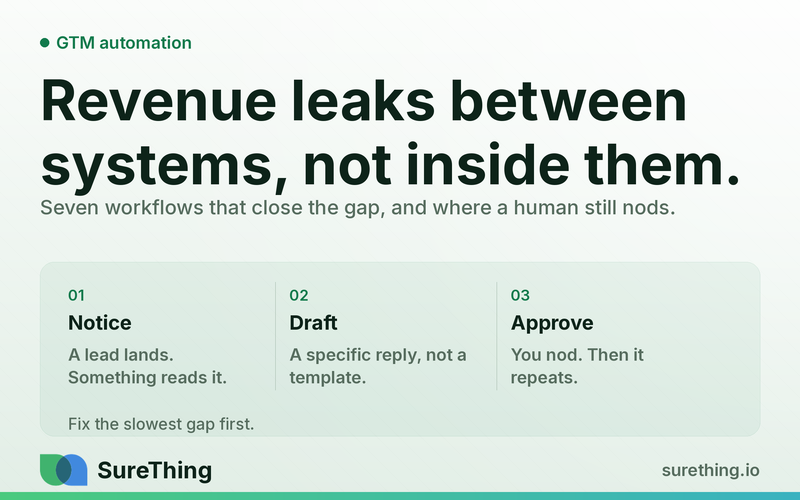
Revenue leaks between systems, not inside them — a lead sitting in the CRM while the owner is on a job site, a quote nobody chased, an ad campaign nobody opened. The seven go-to-market workflows worth automating first, what the agent does alone, and where a human still has to nod.
Key takeaways
"GTM automation" usually means the tool stack — a CRM, an ad platform, an email sender. The part that actually decides whether revenue moves is what watches all of them together and acts inside minutes, not the tools themselves.
Most small businesses lose revenue between systems, not inside them: a lead sits in the CRM while the owner is on a job site, a form fill never gets a reply, an ad spends budget on a keyword that never converts, and nobody notices until the monthly report.
Seven workflows account for almost all of the recoverable revenue: lead capture routing, first-response drafting, no-reply follow-up, quote-to-close nudges, ad spend watching, review-to-lead recycling, and pipeline hygiene.
Each one follows the same shape: a trigger fires, an agent reads the real system of record, drafts or routes the next step, a human approves anything that leaves the building or touches money, and the whole loop repeats on its own after that.
Judge GTM automation on response time and recovered leads, not on how many messages got sent. A faster no is better than a slow maybe.
The GTM bottleneck is speed between systems, not effort inside them
Ask an owner where their GTM effort goes and they will describe activities: posting, running ads, calling leads back, updating the CRM. Ask where the revenue actually leaks and the answer is almost always a gap, not an activity — the twenty minutes between a form submission and someone seeing it, the three days between "I'll get back to you" and actually getting back to you, the ad campaign nobody has opened the dashboard on since it was set up.
Speed matters here for a structural reason, not a motivational one. A small business competing against three other quotes on the same lead does not get graded on effort — it gets graded on whoever called back first with something useful. Second place in that race collects nothing. The problem is not that owners do not know this. It is that watching every channel continuously, at the speed a lead expects, is not a job a person can hold alongside actually doing the work the business sells.
That is the specific gap GTM automation should close: not replacing outreach, but making sure nothing that should get a fast, competent first touch sits untouched because everyone was busy on something else.
What "GTM automation" is actually buying
Strip away the software category names and a small business's go-to-market motion is a handful of repeating loops: something happens (a lead, a form, a missed call, an ad running out of budget), someone needs to notice it, someone needs to decide what happens next, and someone needs to do it. In a five-person business, all four of those roles are usually the same overworked person.
An AI agent can take over the first three reliably — notice, read context, draft the next step — and the fourth only where the action is reversible or already pre-approved. It should never independently decide pricing, discounts, or what a contract says, and it should never be the one hitting send on the first message to a brand-new prospect without someone having agreed that the message is fine to send.
The seven workflows that actually move revenue
Not every part of GTM is worth automating first. These seven, in the order most small businesses feel the pain, are where the return shows up fastest.
1. Lead capture routing
Trigger: a form fill, a chat message, a missed call, or a booking-page abandonment lands anywhere the business collects leads. System: the agent reads the lead's source, stated need, and any existing history in the CRM. Agent behavior: it tags the lead, assigns it to the right queue or person, and drafts a first-response message referencing what the lead actually asked for. Human approval: the assigned person reviews and sends the first message, or pre-approves a template for a defined lead type so only edge cases need a look. Routine: every new lead gets this treatment without anyone remembering to start it.
2. First-response drafting
Trigger: the lead above, or an inbound email/DM that is not yet in any structured queue. System: the agent checks business hours, existing conversation history, and any standard answers already written for common questions. Agent behavior: drafts a specific, non-generic reply — never "Thanks for reaching out, someone will be in touch." Human approval: send is a one-click decision, not a from-scratch write. Routine: the draft is waiting before the owner has finished their coffee.
3. No-reply follow-up
Trigger: N days pass with no response after an outbound message or a quote. System: the agent reads the last message sent and whether the lead opened anything since. Agent behavior: drafts a short, specific follow-up — not a guilt-trip nudge, a new piece of information or a narrower ask. Human approval: approves the cadence once (e.g., "3 follow-ups over 10 days, then park it"), reviews only what the agent flags as unusual. Routine: leads stop dying silently in the CRM.
4. Quote-to-close nudges
Trigger: a quote or proposal has been sent and sits unanswered past its own stated validity window. System: the agent reads the quote status and any calendar activity tied to the deal. Agent behavior: drafts a check-in tied to a real deadline (the quote's expiry, a seasonal cutoff) rather than a vague "just checking in." Human approval: the salesperson approves before send, always — this is the step closest to a real commitment. Routine: nobody has to remember which quotes are aging.
5. Ad spend watching
Trigger: a scheduled check (daily is usually enough) against live ad account data. System: the agent reads spend, clicks, and — critically — what happened after the click, not just the ad metrics. Agent behavior: flags a keyword or campaign burning budget with no downstream leads, drafts a pause or budget-shift recommendation. Human approval: a person approves any spend change; the agent never moves budget on its own. Routine: the account gets watched every day instead of once a month.
6. Review-to-lead recycling
Trigger: a new review lands, positive or negative, on any platform the business is monitored on. System: the agent reads the review content and the reviewer's stated experience. Agent behavior: drafts a reply and, where a positive review mentions an unmet need ("wish they also did X"), flags it as a lead signal, not just a review to answer. Human approval: the owner approves the public reply; nothing posts under the business's name unapproved. Routine: reviews become a lead source instead of a chore.
7. Pipeline hygiene
Trigger: a scheduled weekly pass over the CRM. System: the agent reads every open deal's last-touch date and stage. Agent behavior: flags stalled deals, drafts a one-line status note for deals nobody has touched in two weeks, and proposes closing dead ones. Human approval: the owner confirms which stalled deals actually die versus get a follow-up. Routine: the pipeline stops lying about what is actually active.
Workflow | What the agent does alone | What needs a human | What never gets automated |
|---|---|---|---|
Lead capture routing | Tag, route, draft first message | Approve or send the message | Deciding whether to take the client |
First-response drafting | Read history, draft a specific reply | One-click send approval | Committing to price or scope |
No-reply follow-up | Draft follow-ups on a set cadence | Approve the cadence once | Deciding to discount to win the deal |
Quote-to-close nudges | Draft a deadline-based check-in | Approve every send | Changing contract terms |
Ad spend watching | Flag leaks, draft a budget recommendation | Approve any budget change | Moving money on its own |
Review-to-lead recycling | Draft a reply, flag lead signals | Approve the public reply | Posting unapproved public statements |
Pipeline hygiene | Flag stalled deals, draft status notes | Confirm which deals actually close/die | Auto-closing a deal without a human look |
Where GTM automation stops on purpose
None of these seven workflows send an unreviewed message to a new prospect, change a price or discount, alter a legal or contractual term, or move advertising budget without a person confirming it. The agent's job is to make sure the right draft, flag, or recommendation exists the moment it is needed — not to make the business's commercial decisions. The reference definitions describe the same narrow remit. Marketing automation is characterised as software for automating repetitive tasks and consolidating multi-channel interactions, tracking, lead scoring, campaign management and reporting into one system. Lead generation is described as paired with lead management and lead scoring to move leads through the purchase funnel. Both are about managing and scoring activity. Neither describes a system that decides who you should work with, or on what terms.
This is also why back-office loops and GTM loops are treated as separate systems even though both run on the same agent infrastructure — the approval boundary for "send this internal report" is much looser than the boundary for "send this to a prospect who has never heard from us."
How this actually gets built for a small business
The build order that works is: pick the one workflow costing the most right now (usually lead capture routing or no-reply follow-up), wire the trigger to the real system of record instead of a spreadsheet, get the drafting behavior right and boring — specific, not generic — get one week of a human approving every single output, then widen the approval boundary only for the exact templates that never needed edits. Anthropic's engineering write-up on building effective agents draws the distinction that matters for this build order: workflows are systems where models and tools are orchestrated through predefined code paths, while agents dynamically direct their own processes and tool usage. Most of these seven loops should start life as the former — a predefined path with a human at the approval point — and only earn the latter where the drafting has proven boring and reliable.
Instrument the loop before you widen it
The failure mode with GTM automation is not that it breaks loudly. It is that it quietly keeps running after it stopped being useful — a follow-up cadence still firing at leads who bought three months ago, a budget-leak flag nobody reads because it fires every single day. Automation that is not measured turns into background noise, and background noise gets ignored right up until it embarrasses you in front of a customer.
So each of the seven workflows needs two numbers attached from day one. The first is the volume it handles — how many leads got routed, how many follow-ups went out, how many spend flags fired. The second, and the one that actually matters, is the human-edit rate: what fraction of the agent's drafts got changed before a person approved them. A high edit rate is not a failure, it is the signal telling you the drafting instructions are still wrong. An edit rate that falls to near zero over a couple of weeks is your evidence that a specific template is safe to pre-approve, which is the only honest basis for widening the approval boundary.
Do not widen it on a feeling. Widen it on a template that stopped needing edits, one template at a time, and keep the flag review in place so the loop stays visible. Sales process engineering made the same argument about human sales processes long before agents were involved: a process you have not instrumented is a process you are guessing about.
FAQ
Is this the same as marketing automation software?
No. Marketing automation platforms schedule and score; they do not read a new lead's actual context and draft a specific response. GTM automation as described here sits on top of and reads from those tools — it does not replace the CRM or ad platform, it watches them.
Will this replace my sales process?
No. It removes the delay between something happening and someone competent responding to it. The decisions — who to pursue, what to charge, when to walk away — stay with the person who owns the relationship.
How fast should a lead get a first response?
Faster than your slowest competitor's fastest rep. There is no universal number that survives contact with a specific market, but every hour of delay is an hour a competing quote has to land first.
What is the actual metric to watch?
Response time on new leads and the percentage of no-reply leads that get recovered by a follow-up. Message volume is not a success metric — a lead that gets three good follow-ups and still says no was managed correctly.
Where to start
If only one of these seven gets built this month, make it whichever one is currently costing the most silence — the leads sitting unanswered, or the quotes nobody is chasing. Everything else compounds once that one loop is running reliably. See how the underlying approval pattern works in more detail in how AI agents actually replace repetitive work, or start from how to pick the one thing to automate first if lead follow-up is not the biggest leak in your business.