September 9, 2026
AI for Google Ads: Which Specific Steps It Can Actually Take Over
"AI can manage your ads now" is not one claim - it's several, and only some of them are true unattended. A concrete breakdown of which Google Ads account-management steps AI can run without you, which ones still need your nod, and where the approval line actually sits.
The Short Answer
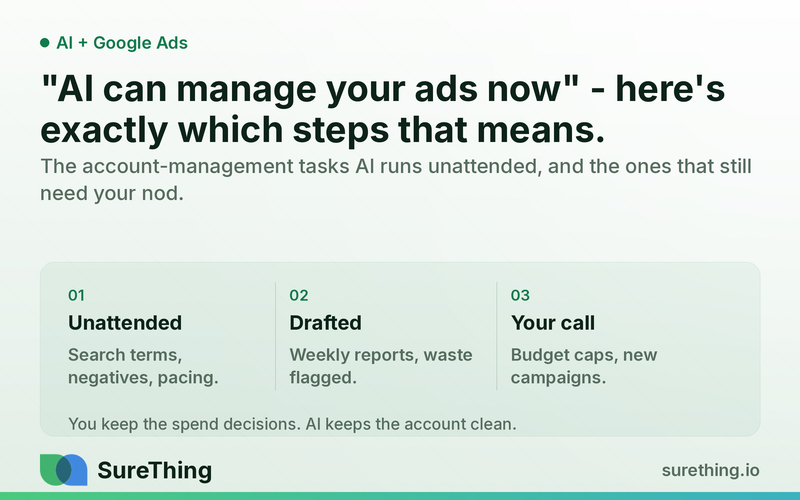
AI can already run the repetitive, data-heavy parts of a Google Ads account on its own — mining search terms, adding negative keywords, watching budget pacing, and writing weekly reports — without a human touching the keyboard. What it still shouldn't do unattended is anything that changes how much money is at risk or where the business is trying to grow: raising budget caps, launching new campaigns, or bidding into a new market. The useful way to think about "AI for Google Ads" isn't as one big automated black box, it's a division of labor with a clear approval line drawn through the middle of it.
Key Takeaways
AI agents can handle search term mining, negative keyword additions, and bid-pacing alerts on a recurring schedule without waiting for a human.
Weekly and monthly reporting is a strong candidate for full automation — the agent reads the account and drafts the summary, a human just skims it.
Anything that changes total spend risk (budget caps) or strategic direction (new campaigns, new markets) needs a human decision, not just a human glance.
The real bottleneck for most owners isn't a lack of ad ideas — it's the 45 minutes of account hygiene that never gets scheduled.
A workable setup treats AI as the person who does the account chores every day and flags exceptions, while the owner or agency makes the calls that move budget.
The goal is an explicit approval boundary, written down, not a vague sense that "the AI is handling it."
The Real Bottleneck: Account Hygiene Never Gets Scheduled
Most small business owners running their own Google Ads account don't lose money because they picked the wrong keywords once. They lose money because nobody logs in on the Tuesday when a search term starts eating $40/day for zero conversions, and nobody notices until the monthly bill arrives. The account itself isn't broken — the maintenance cadence is. Same story if you're paying an agency: the strategy calls are fine, but the day-to-day search term review, negative keyword hygiene, and pacing checks are the first thing that gets skipped when the account manager has twelve other clients.
This is the gap "AI can manage your ads now" is actually pointing at, even when the marketing copy makes it sound bigger than it is. The agent isn't replacing strategic judgment about your business. It's replacing the person who was supposed to check the account every day and didn't, because checking an account every day is tedious, low-leverage work that a busy owner will always deprioritize in favor of actually running the business. That's the bottleneck: not creativity, not strategy, but consistency on unglamorous tasks that compound if ignored. If you want the fuller list of what an agent can realistically be assigned across a business, the overview of what AI agents can actually do is a useful baseline before you decide where the line sits for your ads account specifically.
A Runnable Workflow: How the Handoff Actually Works
Below is what an unattended-but-bounded workflow looks like in practice, broken into the five stages that matter: what starts it, what the agent reads, what it does on its own, where a human has to nod, and how it becomes a routine instead of a one-off cleanup.
Trigger
The workflow doesn't wait for you to remember to log in. It runs on a schedule — daily for pacing checks, weekly for search term review and reporting — and it can also trigger on an event, like a campaign crossing a spend threshold faster than expected, or a conversion rate dropping below a set floor for three consecutive days. The trigger is the thing that makes this different from "I'll check the account when I have time," which in practice means never.
Read
Before doing anything, the agent reads the actual data: the search terms report for every active campaign, current spend against daily and monthly budgets, quality score and impression share trends, and recent conversion data pulled from the account and, where relevant, cross-referenced against Search Console data for organic overlap. It reads what changed since the last cycle, not just the current snapshot — a term that was fine last week but spiked this week matters more than one that's been quietly wasting $2/day for months. This is also where it checks account-level guardrails: what the current budget cap is, what campaigns are marked as "do not touch," and what the approved negative keyword list already excludes.
Does
With that context, the agent does the work that doesn't require a strategic call:
Flags and drafts negative keyword additions for search terms that clearly don't match intent (irrelevant queries, competitor names you don't want to bid on, obvious non-buyers).
Mines the search terms report weekly and groups new queries by relevance, so the human review is a five-minute skim instead of a spreadsheet dive.
Monitors budget pacing daily and drafts an alert the moment a campaign is on track to blow through its monthly cap early or underspend significantly.
Drafts the weekly performance summary — spend, conversions, cost per conversion, notable shifts — in plain language, ready for a human to read in under two minutes.
Watches for quality score drops or disapproved ads and drafts a note explaining likely cause, without touching the ad itself.
Everything in this list is a draft or a flag, not a live change to spend or strategy. That distinction is the whole point of the setup described on SureThing's Google Ads optimization page, where the agent's job is framed as continuous account hygiene rather than autonomous strategy-setting.
Nod
This is the approval boundary made explicit. The agent doesn't push a single negative keyword live, doesn't touch a budget number, and doesn't launch anything — it drafts, and a human nods. In practice the "nod" step should take a few minutes, not a few hours: the owner or account manager opens a short summary, sees the proposed negative keywords with the search terms that triggered them, sees the pacing flag with the number behind it, and approves or edits with one click. If the draft is wrong, that's useful information too — it tells you the agent needs tighter instructions, not that the whole idea failed.
Routine
The habit only sticks if it's boring in a good way. Daily: pacing check, budget alert if needed. Weekly: search term mining, negative keyword batch for approval, performance summary. Monthly: a slightly longer review that looks at trends across the month — which is also the natural point to decide whether anything needs to graduate from "flagged" to "human decision," like a search term category that keeps recurring and might justify its own ad group. The routine works precisely because none of the individual steps are exciting; they're the equivalent of the agent doing the dishes every night so nobody's stuck with a sink full of them on Sunday.
Manual vs. Automated: Where the Line Actually Sits
Task | Manual (typical today) | Automated with AI agent | Who approves |
|---|---|---|---|
Search term review | Done sporadically, often monthly or skipped | Mined weekly, grouped by relevance automatically | Human skims and approves in bulk |
Negative keyword additions | Added reactively after noticing wasted spend | Drafted proactively from search term data | Human nods before it goes live |
Budget pacing checks | Checked when the invoice arrives | Monitored daily with threshold alerts | No approval needed for the alert itself |
Weekly reporting | Compiled manually or skipped when busy | Drafted automatically from account data | Human reads, no action required |
Raising a budget cap | Owner or agency decides based on performance | Agent can flag that performance supports it | Human decides and executes |
Launching a new campaign or market | Strategic decision, researched and planned | Agent can surface data supporting the idea | Human decides and executes |
The Boundaries: What Runs Unattended, What Needs a Nod, What Should Never Be Automated
What can run unattended
Search term mining, negative keyword drafting, budget pacing monitoring, quality score and disapproval alerts, and weekly reporting can all run on a schedule without a human present for each cycle. These are pattern-recognition and data-compilation tasks with low downside risk if the agent flags something incorrectly — worst case, a human dismisses a bad suggestion during the next review. None of these change how much money is at stake or what the account is trying to accomplish; they keep the existing account clean and legible.
What needs a human nod
Anything that touches live spend or live copy needs a person to say yes before it goes out: pushing a negative keyword list live, pausing or enabling a campaign, adjusting bids in a meaningful way, and publishing any drafted ad copy changes. The agent's job here is to make the "yes" fast and well-informed — showing exactly which search terms triggered a suggestion, or exactly how far off-pace a campaign is — not to make the decision disappear entirely.
What should never be automated
Raising a budget cap, launching a brand-new campaign, or deciding to bid into a new geographic or product market are strategic bets, not maintenance tasks, and they should stay with a human every time, regardless of how confident the agent's underlying data looks. These decisions involve context an agent doesn't have full visibility into — cash flow timing, inventory or capacity constraints, how a new market fits the broader business plan — and getting them wrong costs real money in a way a missed negative keyword doesn't. It's also worth being clear-eyed here the way you would in any regulated field: nothing in this workflow should be treated as financial advice about how much to spend or where to invest ad budget; the agent surfaces data, a human makes the call with full knowledge of their own business finances.
FAQ
Can AI actually manage a Google Ads account with no human involvement at all?
Not responsibly, no. AI can run the recurring maintenance — search term mining, negative keywords, pacing alerts, reporting — without a human present for each cycle, but decisions that change spend risk or account strategy should still get a human nod before they go live.
Will this replace my agency?
It's more likely to change what you're paying the agency for. If an agent handles the daily hygiene, the agency's time (and your budget) can shift toward strategy, creative testing, and the decisions that genuinely need a human perspective, rather than paying for someone to manually scan search term reports.
How much time does this actually save on a small account?
It varies by account size and how neglected it currently is, but industry data on ad spend waste generally points to search term mismatches and unchecked pacing as recurring, avoidable drains — see research on wasted ad spend in small business search advertising for the general pattern. The time saved is less about hours logged and more about the fact that the checks happen every week instead of never.
What happens if the AI drafts a bad negative keyword suggestion?
Because every suggestion sits in the "nod" stage before going live, a bad draft just gets rejected during review — it never touches the account. Over time, rejecting bad suggestions is also useful feedback for tightening the agent's instructions.
Is this the same as Google's own automated bidding features?
No — Google's automated bidding (like Target CPA or Maximize Conversions) adjusts bids inside the auction based on its own signals, which is a different layer from account hygiene. An agent handling search terms, negatives, and reporting works alongside whatever bidding strategy you're using; it doesn't replace it. General guidance on how automated bidding fits into a broader account strategy is worth reviewing separately — see guidance on automated bidding strategies for small advertisers for that layer specifically.
Where to Go From Here
If you're currently running your own account and the search term report hasn't been opened in a month, or you're paying an agency and genuinely aren't sure what happens to your account between monthly calls, the fix isn't to hand over full control to an AI and hope. It's to get explicit about which of these steps you'd trust running on a schedule and which ones you want to keep approving yourself. That line is different for every business, and it's fine to start narrow — search term mining and reporting only, for instance — and widen it once you've seen a few weeks of drafts come through. Browse the full list of SureThing agent skills if you want to see the building blocks before deciding what to turn on first, no pressure to automate more than the one or two chores that are actually costing you time right now.