May 20, 2026
How One Operator Runs 32 Routines Without Hiring
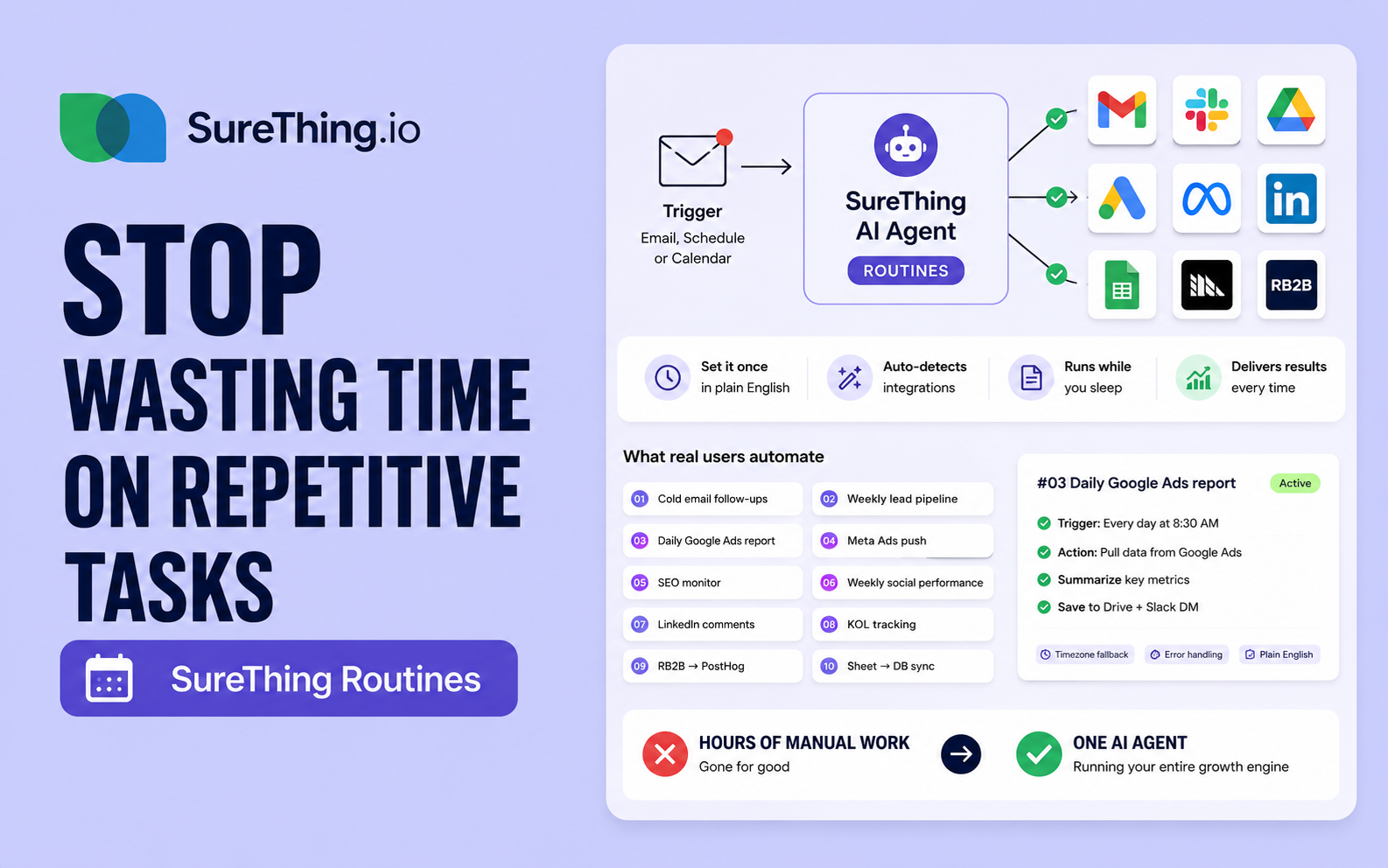
Routines is the new SureThing feature that lets you set an AI agent on a trigger — email, schedule, or calendar event — and tell it what to do in plain English. Auto-detects the integrations you need and connects them in one click. Watch how one operator runs an entire growth function — 32 active routines across 9 projects — without hiring.
Every Monday at 9am, I check the dashboard. Every morning, I scan the inbox. Every Friday, I draft the same three social posts.
What if all of that — just ran on its own?
That's the question Routines answers. Set it once. Your AI agent does the rest.
What Routines is (and isn't)
Routines is the new feature in SureThing where you set up an AI agent to run on a trigger — an email arriving, a recurring schedule, or a calendar event — and tell it what to do in plain English.
It's not no-code-with-sharp-edges. There are no flowcharts. No glue code. No 14-step OAuth onboarding before you can do anything. You write what you want in English, SureThing auto-detects which integrations you need, and you connect them once.
Start from a template
The Routines library opens with a panel of pre-built workflows:
Inbox watch — pings you in Slack when an email lands that you actually care about (a new contract, a customer reply, a failed payment)
Save to calendar — drafts calendar events from emails mentioning flights, meetings, deadlines, appointments
Daily briefing — every morning at 8, sends a digest of unread emails, today's calendar, and top deadlines
Topic watch — scans the web and social platforms every morning for new mentions of your brand, competitors, and topics you care about
One click. Done.
Or build your own
Click New Routine. Name it. Pick a trigger — Email, Schedule, or Calendar event. Write the action in plain English:
When an email I care about lands in my inbox — a new contract, a customer reply, a failed payment — ping me right away in Slack.
SureThing reads that, recognizes you'll need Gmail and Slack, and shows them at the bottom of the form. One click each to connect.
Hit Create Routine. Done. Your agent is now watching, ready to act the moment the trigger fires.
What real users do
This is what's possible once you're set up: 32 active routines across 9 projects. One operator running an entire growth function — without hiring.
Some highlights from a real account:
Cold email follow-ups (Gmail + AppDB) — Sends a follow-up when prospects go quiet.
Weekly lead pipeline summary (Sheets + HubSpot) — Every Monday at 9:30.
Daily Google Ads report (Google Ads + Sheets) — Across two accounts, every morning at 10.
Meta Ads daily push (Meta) — Performance metrics every day at 10.
SEO traffic monitor (Search Console + GA4) — Tracks the blog every day at 5pm.
Weekly social performance (X + LinkedIn + YouTube) — Aggregates across every connected platform.
Daily LinkedIn comment monitor (LinkedIn) — Watches engagement on a specific KOL post.
KOL post tracking (X + LinkedIn) — Tracks 8-day campaign reach and replies.
RB2B visitor sync (RB2B + PostHog) — Anonymous visitor identity → product analytics, every 24 hours.
Sheet → DB sync (Sheets + AppDB) — Cold-email tracking sheet flows into the production database every 30 minutes.
That's 10 of 32. The other 22 cover everything from Twitter replies to error-tracking alerts to weekly Semrush keyword reports.
Real depth, in plain English
Click into any one of these routines and you'll find the action prompt is just English — but with real depth. From a working SEO traffic monitor routine:
Stabilize step: if the GA4 property timezone changes, GSC data starts arriving (currently empty), or new dimensions become useful (landing page, country, device), update
scripts/blog_seo_daily.pyand keep the action unchanged. The script is the single source of truth — do not inline logic in this action.
Stabilize steps. Timezone fallbacks. Single-source-of-truth references. This isn't a toy. It's the same kind of instruction you'd write to a teammate — except this teammate is on duty every morning, at the same minute, forever.
Where this goes next
The interesting thing about Routines isn't any single automation. It's the ceiling.
One person running cold email + lead pipeline + paid ads reporting + SEO monitoring + social performance + visitor tracking + database sync — at the cadence each one actually needs.
If you're a solo founder, indie hacker, or someone running a marketing/growth function without a team to back you up: this is the leverage you've been waiting for.
Try it
Routines is live now at surething.io/routines.